Most companies have customer training. Far fewer have self-service customer training—education structured so customers find answers independently, in seconds, without opening a ticket or waiting for a CSM.
The difference isn’t content volume. It’s architecture.
Self-service customer training is built around how customers actually behave when they’re stuck: they search, in their own words, from wherever they already are. They don’t browse a catalog. They don’t enroll in a course and sit through six modules to reach the one section they need. They type a question and expect an answer. Training that doesn’t meet them there isn’t self-service—no matter how much of it you’ve produced.
This is where most platforms fall short. Traditional LMS platforms deliver only 20-25% adoption because enrollment-gated, sequential course structures are the opposite of self-service. A customer with a question at 2pm won’t enroll in anything. They’ll search—and if your training can’t be searched in their language from inside their workflow, they’ll give up or ask a human instead.
True self-service rests on three architectural foundations: search-first retrieval, modular content customers access independently, and embedded delivery that meets customers where they already work. Get those right and training becomes something customers actually use—not a library that sits untouched.
This guide covers what separates self-service training from traditional course-based approaches, why knowledge-hub architecture matters more than content volume, and how to measure whether training is genuinely deflecting work or just available. For comprehensive context on why traditional customer training approaches fail and what modern platforms must deliver, see the Customer Training LMS: Strategy, ROI & Implementation Guide.
Knowledge Hubs: The Self-Service Architecture
Self-service customer training requires a knowledge hub, not a course library.
What Makes a Knowledge Hub Different
Course library thinking:
- Content organized by topics and categories (how you think about it)
- Sequential structure (complete Module 1 before Module 2)
- Catalog browsing (find the right course, then find the right lesson)
- Completion tracking as primary metric
Knowledge hub thinking:
- Content organized by questions and problems (how customers think about it)
- Modular structure (access any piece independently)
- Search as primary interface (type question, get answer)
- Deflection and adoption as primary metrics
The architectural shift enables self-service. Customers don’t need to understand your content taxonomy. They just need to type their question.
How Customers Actually Use Self-Service Training
Usage patterns reveal how self-service differs from traditional learning:
Traditional course usage:
- 20-30% of customers access training
- 10-15% complete courses
- Average session: 25+ minutes
- Repeat usage: low
Self-service knowledge hub usage:
- 60-80% of customers access training
- 65-75% find what they need
- Average session: 3-5 minutes
- Repeat usage: high (customers return when they have questions)
Self-service training is used frequently, briefly, and successfully. Traditional training is used rarely, attempted occasionally, and abandoned often.
The difference matters for ROI. High-utilization training that prevents support tickets delivers far more value than comprehensive courses that sit unused.
Why Traditional Customer Training Isn’t Self-Service
Most companies believe they already have self-service training. They’ve created help centers, recorded videos, written documentation, and built course libraries.
Customers still contact support.
The problem isn’t effort. It’s structure.
Course Libraries vs. Knowledge Hubs
Course-based training says: “Browse our catalog. Find the relevant course. Complete modules sequentially to get your answer.”
Self-service training says: “Type your question. Get your answer in 5 seconds.”
When a customer encounters an error message at 3pm and needs to fix it now, they won’t:
- Navigate to the training portal
- Browse course titles
- Guess which course contains the answer
- Watch modules sequentially until finding the relevant section
They’ll open a support ticket. It’s faster.
The architectural difference matters. Course libraries optimize for organization (how you categorize content). Knowledge hubs optimize for retrieval (how customers find answers).
Self-service requires the latter.
The Discoverability Gap
Here’s the most common failure pattern:
A customer searches your help center for “SSO not working.” Returns zero results. Opens ticket.
The answer exists. It’s in a document titled “Authentication Configuration Guide v3.2 – Enterprise Edition.”
The customer used different words than you used to title the content. Traditional keyword search failed. Support gets the ticket.
This happens hundreds of times across different topics. Customers search using their language. Content is titled using your internal terminology. The gap creates support load that looks like missing documentation but is actually a discoverability problem.
For a comprehensive exploration of why traditional training structures fail and what replaces them, see Why Customer Training Fails (And How Modern Platforms Fix It).

What Makes Training Actually Self-Service
Self-service customer training requires three architectural foundations that most platforms lack.
1. Search-First Architecture
Self-service starts with search, not navigation.
Customers arrive with questions, not topics. They type “SSO not connecting” or “export data to CSV.” They need immediate answers.
Traditional approach: Keyword search matches exact terms. “SSO not connecting” returns nothing because your documentation says “Webhook Troubleshooting” and “API Event Delivery Issues.”
Self-service approach: Deep search understands intent. “SSO not connecting” surfaces all relevant content about SSO configuration, common errors, API connectivity, and event delivery—even when exact terms don’t match.
Behind the scenes, AI indexes every video transcript, PDF, and document. When customers search, they land on the specific section, timestamp, or module that addresses their question.
One pilot customer discovered 20 customers had searched “user permissions” with zero results. They added a short video. Searches dropped 80%. Support tickets about rate limits fell by a third the following month.
That’s the difference between keyword search and search built for self-service.
For detailed technical capabilities enabling this, see Deep Search.
2. Modular, Independently Accessible Content
Self-service requires bite-sized answers, not comprehensive courses.
When a customer needs to configure SSO, they don’t need the entire “Enterprise Security Administration” course. They need 2 minutes on SSO configuration specifically.
Modular architecture means content exists as small, focused pieces (2-5 minutes each) that customers can access directly. No prerequisites. No forced sequences. Just the answer to their specific question.
The same module can appear in multiple contexts:
- Direct search results
- Embedded in help center articles
- Linked from error messages
- Included in optional learning paths for customers who want structure
Traditional platforms require content duplication for this flexibility. Modern platforms handle it automatically through tagging and dynamic assembly.
One pilot customer broke their 45-minute onboarding course into 8 searchable modules. Completion jumped from 18% to 67% because customers found exactly what they needed without watching irrelevant sections. Support tickets during onboarding dropped 38%.
For more on how modular architecture enables both self-service and structured learning simultaneously, see Modular Learning.
3. Measurable Self-Service Outcomes
Self-service isn’t just about deflecting tickets—it transforms the entire customer training economics: faster activation, higher feature adoption, and training engagement rates 3-4x above industry averages.
See the full outcomes breakdown with enabling technical capabilities →
These outcomes require architecture that supports self-service behavior, not just content that answers questions. The next foundation makes this possible.
4. Embedded Everywhere Customers Work
Self-service training can’t require customers to leave their workflow.
If help resources live in a separate portal requiring navigation and login, most customers won’t use them. They’ll contact support instead.
Effective self-service embeds training directly in:
- Product interface (via iframe integration in help centers)
- Support ticket responses (surfacing relevant training before escalation)
- Error messages and notifications (contextual help at moment of confusion)
- Onboarding emails (behavioral triggers based on usage patterns)
One pilot customer embedded a searchable training portal in their dashboard. When customers encountered issues, they could search for help without leaving the page. Support tickets for common configuration questions dropped 44% within 60 days.
The principle: reduce friction between question and answer to zero. If customers can get help faster by asking support than by searching, they’ll always choose support.
For implementation strategies and real-world examples, see Embedded Learning.
Measuring Support Deflection: What Actually Matters
Support deflection isn’t about how many people viewed training. It’s about whether training prevented tickets that would have otherwise been created.
The Right Metrics
1. Topic-Specific Ticket Volume
Track tickets by category before and after training launches for that topic.
Example:
- Baseline: 80 tickets/month about “SSO setup”
- Post-training: 52 tickets/month
- Deflection rate: 35%
This is the clearest signal that training is working.
2. Search-to-Ticket Ratio
How many customers search for a topic versus how many open tickets about it?
High searches, low tickets = self-service working.
Low searches, high tickets = customers can’t find answers.
One pilot customer tracked this ratio weekly. When “API authentication” showed 200 searches but 45 tickets in the same period, they knew self-service was working. When “data export” showed 15 searches but 30 tickets, they knew customers couldn’t find help and improved discoverability.
3. First-Contact Resolution Rate
When tickets do arrive, how often does support resolve them by linking to existing training?
High first-contact resolution via training links = content exists but isn’t discoverable.
This metric reveals exactly where self-service is failing despite having the right content.
4. Time-to-Resolution for Remaining Tickets
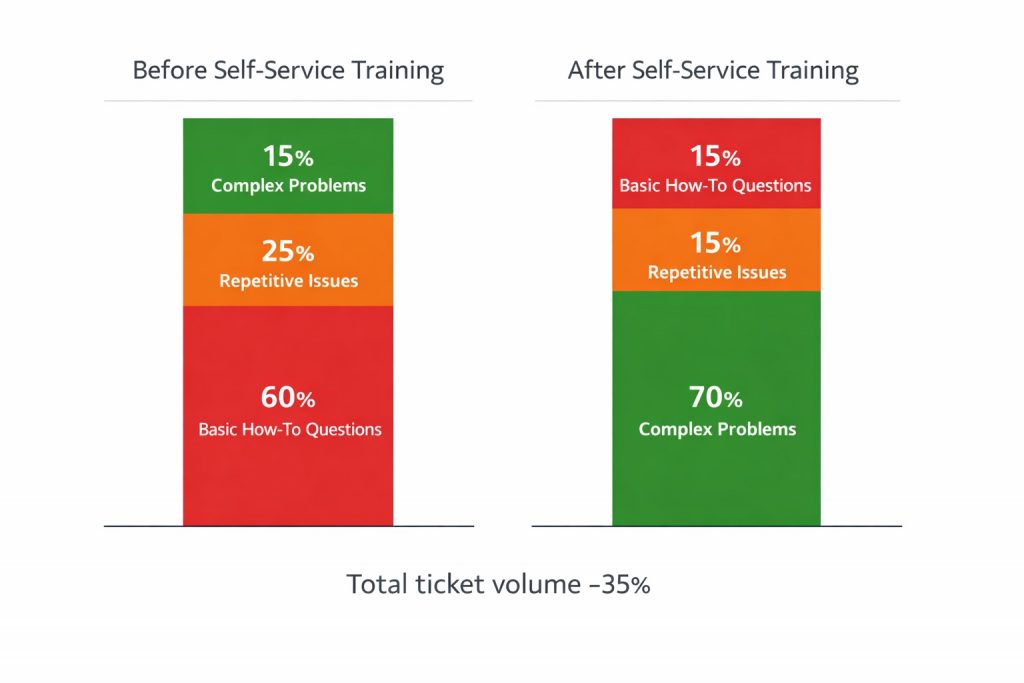
Self-service training doesn’t eliminate all tickets. But it should eliminate simple, repetitive ones—allowing support to focus on complex issues.
Effective self-service shifts ticket composition from 60% basic questions to 80% complex problems. Average resolution time often increases (complex issues take longer) but overall support load decreases because volume drops significantly.
What Good Looks Like
Strong self-service customer training performance:
- 30-40% reduction in repetitive ticket volume within 90 days
- 60-80% of training content actively accessed (vs. 20-30% for courses)
- Search success rate above 70% (customers find relevant answers)
- Support team spending <30% time on “how do I” questions (vs. 40-60% baseline)
These benchmarks indicate training is genuinely self-service, not just available.
Embedding Training in Support Flows
The most effective self-service training doesn’t wait for customers to search. It surfaces answers proactively at moments of likely confusion.
At the Point of Error
When customers encounter error messages, that’s the moment they need help—not later when they remember to search.
Effective implementation:
- Error messages include “Learn more” links to specific troubleshooting content
- Common errors trigger contextual help automatically
- Failed actions suggest relevant training modules
One pilot customer added contextual help links to their three most common error messages. Support tickets about those errors dropped 52% within 30 days. Customers got help immediately instead of interrupting their workflow to contact support.
In Support Ticket Workflows
Before escalating to human support, systems can surface relevant training content based on ticket description.
Implementation:
- Support widget searches training content as customer types ticket description
- Suggests 2-3 most relevant articles/videos before submission
- “Did this solve your problem?” prevents unnecessary ticket creation
Companies using this approach see 15-25% of tickets resolved before submission. Customers get instant answers. Support load decreases. Both parties benefit.
During Onboarding
The first 30 days generate disproportionate support load as customers encounter basic setup and configuration challenges.
Self-service onboarding reduces this load by:
- Making setup guidance searchable (not locked in sequential courses)
- Triggering contextual help based on incomplete activation steps
- Surfacing troubleshooting content when customers get stuck
For a comprehensive framework on progressive onboarding that reduces support dependency, see Customer Onboarding Training: From Signup to First Value (90-Day Blueprint).
Scaling Customer Education Without Scaling Headcount
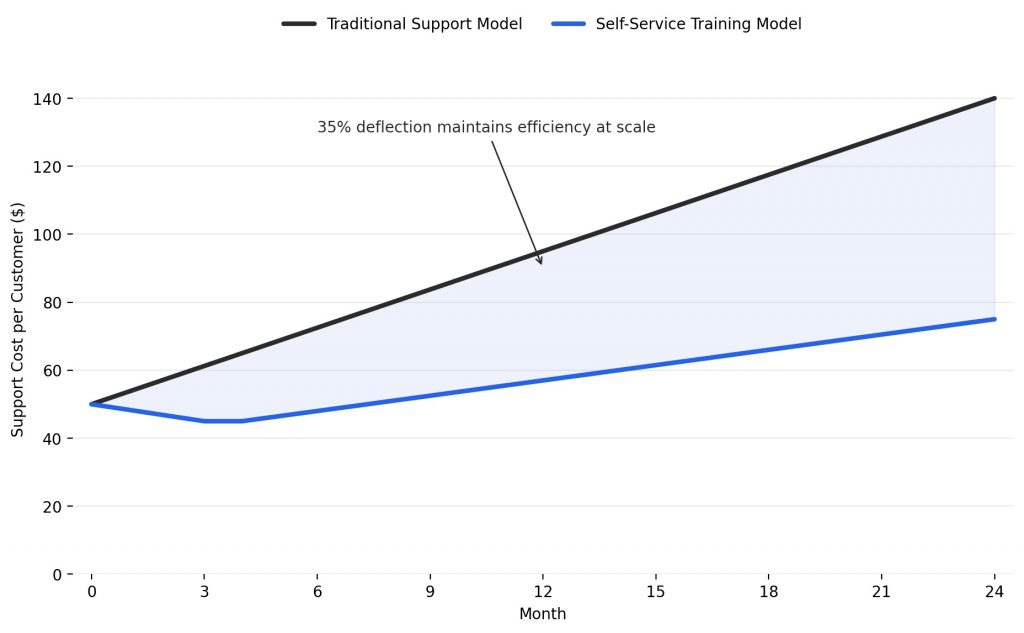
Self-service training’s ultimate value: it scales infinitely without proportional cost increases.
The Scaling Math
Traditional model:
- 100 customers → 50 tickets/week → 2 support engineers
- 500 customers → 250 tickets/week → 10 support engineers
- 1,000 customers → 500 tickets/week → 20 support engineers
Self-service model:
- 100 customers → 50 tickets/week → 2 support engineers
- 500 customers → 165 tickets/week (35% deflection) → 6 support engineers
- 1,000 customers → 325 tickets/week (35% deflection) → 13 support engineers
The savings compound. At 1,000 customers, self-service training prevents 7 support engineering hires—roughly $700,000-$1M annually in fully loaded costs.
How Content Scales
Self-service content economics differ fundamentally from live training:
Creating the content: One-time investment (hours of effort, consistent across all approaches)
Delivering the content:
- Live training: Scales linearly with customers (100 customers = 100 sessions)
- Recorded courses: Scales efficiently but still requires course completion
- Self-service modules: Scales infinitely—customers access exactly what they need
Maintaining the content:
- Courses: Update entire course when one section changes
- Modules: Update specific module, all references update automatically
One pilot customer calculated their self-service training maintenance required 8 hours/month to keep current. Their previous course-based approach required 40+ hours/month because changes to one feature required re-recording entire courses.
The CSM Time Multiplier
Support deflection isn’t the only scaling benefit. Customer success teams also spend significantly less time on basic questions.
Companies with effective self-service training report CSMs spending:
- 70% of time on expansion, optimization, and strategic initiatives
- 30% of time on basic onboarding and troubleshooting
Without self-service training:
- 40% of time on expansion and strategy
- 60% of time on basic questions and reactive support
The shift allows CSMs to focus on revenue-generating activities rather than repeating training that should be self-service.
Common Self-Service Training Mistakes (and How to Avoid Them)
Mistake 1: Measuring Availability Instead of Deflection
The Problem: Teams celebrate “We published 50 new articles!” without tracking whether those articles reduced support tickets.
The Fix: Measure topic-specific ticket volume before and after training launches. If tickets don’t decrease, training isn’t working regardless of content volume.
Mistake 2: Building More Courses When Search Is Broken
The Problem: Customers can’t find existing content, so teams assume they need more content. They build more courses. Discoverability remains broken.
The Fix: Track what customers search for but don’t find. Fix discoverability gaps before creating new content. Often, improving search and organization delivers more value than new courses.
Mistake 3: Hiding Training Behind Separate Portals
The Problem: Training lives in a separate system requiring navigation and login. Customers contact support instead because it’s faster.
The Fix: Embed training where customers already work. If accessing help requires leaving your product or support flow, adoption will remain low regardless of content quality.
Mistake 4: No Feedback Loop Between Support and Training
The Problem: Support sees repeated questions daily. Training team doesn’t know what’s being asked. Content priorities misalign with actual customer needs.
The Fix: Weekly review of support ticket categories and search gaps. If a question gets asked repeatedly, training should address it proactively. Close the loop.
Mistake 5: Optimizing for Completion Instead of Deflection
The Problem: Teams focus on course completion rates while support ticket volume climbs.
The Fix: Primary metric should be support deflection, not engagement. A 90% completion rate means nothing if customers still contact support about covered topics.
When Self-Service Training Needs Human Support
Effective self-service doesn’t eliminate support. It focuses support on work that genuinely requires human expertise.
What Should Remain in Support
- Complex integrations requiring custom configuration
- Edge cases not covered in standard documentation
- Product bugs and technical issues
- Strategic guidance on advanced workflows
- Enterprise-specific implementations
These represent 20-40% of tickets in companies with strong self-service training. They’re the work support teams were designed to handle.
What Self-Service Should Handle
- Feature usage basics (“How do I create a report?”)
- Common configuration questions (“How do I add team members?”)
- Troubleshooting standard errors
- Setup and onboarding guidance
- Frequently asked questions
These represent 60-80% of tickets currently but should be self-service. When training handles this work, support teams become strategic advisors rather than training delivery systems.
The Long-Term Impact of Self-Service Training
Self-service customer training doesn’t just reduce support costs. It compounds over the customer lifetime.
Customers who can find answers independently:
- Reach activation faster (30-50% improvement in time-to-value)
- Adopt more features (2-3× more features used)
- Require less CSM intervention (CSMs focus on expansion)
- Report higher satisfaction (immediate answers vs. ticket wait times)
- Churn less frequently (confident, independent users stay longer)
The inverse is also true. Customers who repeatedly contact support for basic questions develop learned helplessness. They stop trying to solve problems independently because asking support is more reliable than searching training.
Self-service training breaks this pattern. It builds customer confidence and competence progressively, reducing dependency rather than reinforcing it.
For organizations ready to transform how customers learn and scale support efficiently, self-service training represents the clearest path forward. It respects how customers actually want to learn (on-demand, specific answers, no waiting), reduces costs that scale linearly with growth, and enables support teams to focus on complex, high-value work.
That’s the difference between training that exists and training that works.
For comprehensive strategic context on customer training implementation, measurement, and ROI, see the Customer Training LMS: Strategy, ROI & Implementation Guide.
Beetsol’s Approach to Self-Service Customer Training
Beetsol is built specifically for self-service at scale.
How it works:
Deep search eliminates the discoverability gap: Customers type natural questions and find answers in seconds—even when their words don’t match your content titles. AI understands intent, not just keywords.
Modular content enables precise answers: No forced courses. Customers access the specific 2-minute module they need right now, not 30 minutes of content to find one answer.
Embedded everywhere: Training integrates into your product, help center, and support flows via iframe. Customers get help without leaving their workflow or opening tickets.
Analytics that reveal gaps: See what customers search for but don’t find, which training correlates with reduced tickets, and where self-service breaks down. Fix gaps proactively.
The result: 30-40% support deflection, 60-80% content utilization, and training that scales without headcount.
To explore how modern customer training platforms enable self-service at scale, see Beetsol’s approach to customer training or review the complete platform capabilities that make support deflection measurable and sustainable.
FAQ
What is self-service customer training?
Self-service customer training enables customers to find answers independently through searchable, modular content accessible exactly when they need help—without requiring support intervention or scheduled sessions.
How much can self-service training reduce support tickets?
Companies with effective self-service training typically see 30-40% reduction in repetitive ticket volume within 90 days. The deflection rate depends on how many tickets are “how do I” questions versus complex issues requiring human expertise.
What’s the difference between a knowledge hub and a course library?
Course libraries organize content by topics and require navigation through catalogs. Knowledge hubs organize content by questions and enable direct search to specific answers. Self-service requires the latter.
How do you measure if training is actually deflecting support tickets?
Track topic-specific ticket volume before and after training launches. Compare search volume to ticket volume for the same topics. Monitor first-contact resolution rate when support links to training. These metrics reveal whether training prevents tickets or just exists unused.
Why do customers still contact support when training exists?
Usually because training isn’t discoverable. Customers search using their language, content is titled using your terminology, and keyword search fails. Even comprehensive training doesn’t reduce tickets if customers can’t find answers in seconds.
Can self-service training work for complex products?
Yes. Complex products especially benefit because support load is higher. The key is modular content addressing specific tasks rather than comprehensive courses. Customers need bite-sized answers to immediate questions, not certification programs.
How long does it take to see support deflection results?
Most companies see measurable deflection within 30-60 days if training is genuinely self-service (searchable, modular, embedded). If ticket volume doesn’t decrease within 90 days, training architecture needs adjustment—usually around discoverability.
Should all customer training be self-service?
No. Self-service handles repetitive, documented questions (60-80% of volume). Complex integrations, strategic guidance, and unique edge cases still benefit from human support. Self-service focuses support on high-value work by handling routine questions.
What metrics indicate self-service training is working?
Support deflection rate (30-40%), content utilization (60-80%), search success rate (70%+), time spent by support on basic questions (<30% vs. 40-60% baseline), and customer satisfaction with help resources (measured via feedback).
How does self-service training scale without adding costs?
Content is created once and accessed infinitely. Customers find answers 24/7 without requiring support engineers to respond. As customer base grows, training costs remain flat while support costs would scale linearly without deflection. The savings compound at scale.