Customer onboarding doesn’t end when the welcome email sends.
It ends when customers reach their first moment of undeniable value—when they complete a task, solve a problem, or achieve an outcome they couldn’t accomplish before.
For most products, that moment should happen in days, not weeks.
Yet the data reveals something uncomfortable: 40-60% of customers who sign up never return after their first session. Among those who do return, only 25-35% reach meaningful product adoption within 30 days. The rest linger in partial activation, using a fraction of capabilities while evaluating whether continued effort is worthwhile.
The failure isn’t a lack of onboarding content. It’s that customers can’t find the right guidance at the right moment.
Traditional onboarding delivers everything upfront in structured courses: product tours, feature overviews, best practices, integrations, and advanced use cases—all before customers complete a single meaningful task. The logic seems reasonable: give customers everything they need, so they’re prepared for success.
The reality is different. Cognitive load research shows learners retain only 10-20% of information presented without immediate application. When training precedes relevance, almost nothing sticks. Customers finish onboarding feeling informed but not capable. When they attempt real work days later, they’ve forgotten most of what was covered.
Progressive onboarding works differently. It delivers searchable, modular guidance exactly when customers need it across a 90-day journey—from initial setup to confident, independent usage. This isn’t theoretical. It’s how companies cut time-to-value in half, reduce early churn by 30-50%, and scale onboarding without adding headcount.
That’s where modern training architecture becomes essential.
For a comprehensive look at why traditional customer training approaches fail structurally and what modern platforms must deliver, see the Customer Training LMS: Strategy, ROI & Implementation Guide.
Why Traditional Onboarding Training Fails
Before building effective onboarding, it’s essential to understand why most approaches underperform.
The Front-Loading Trap
Most onboarding programs compress all training into the first week.
Customers receive product tours, feature overviews, best-practice guides, integration walkthroughs, and advanced use-case documentation—all before they’ve completed a single meaningful task.
Cognitive load overwhelms retention. When training precedes relevance, customers remember almost nothing. They finish onboarding feeling prepared, but struggle when real work begins days later. Instead of feeling enabled, they feel confused—despite having “completed” training.
The One-Size-Fits-All Problem
Not all customers enter with the same baseline knowledge, role, or goals.
A technical founder setting up a developer tool has radically different needs than a non-technical operations manager adopting the same product. An enterprise admin configuring permissions for 500 users needs different guidance than a solo user exploring features.
When onboarding delivers identical content to everyone, it serves no one well. Advanced users waste time on basics. Beginners feel overwhelmed by complexity. Role-specific tasks remain undiscovered because training prioritizes generic walkthroughs.
The Course Navigation Problem
Here’s where most onboarding training breaks down completely: even when the right content exists, customers can’t find it when they need it.
Day 7 reality: A customer tries to configure SSO. Your onboarding course covered this somewhere, but they skipped ahead to activate faster. Now they’re stuck. Do they:
- Navigate back through the course catalog? (Most won’t)
- Search for “SSO setup” and find nothing because it’s titled “Authentication Configuration Module 8”? (Common)
- Contact support? (This is what happens)
Day 45 reality: A customer wants to automate reports, but doesn’t remember if training exists for this. Do they:
- Browse through course titles hoping to spot it? (Too time-consuming)
- Search for “automate reports” and find nothing because the feature is called “Scheduled Exports” in your system? (Mismatch)
- Give up and continue manual work? (Feature remains undiscovered)
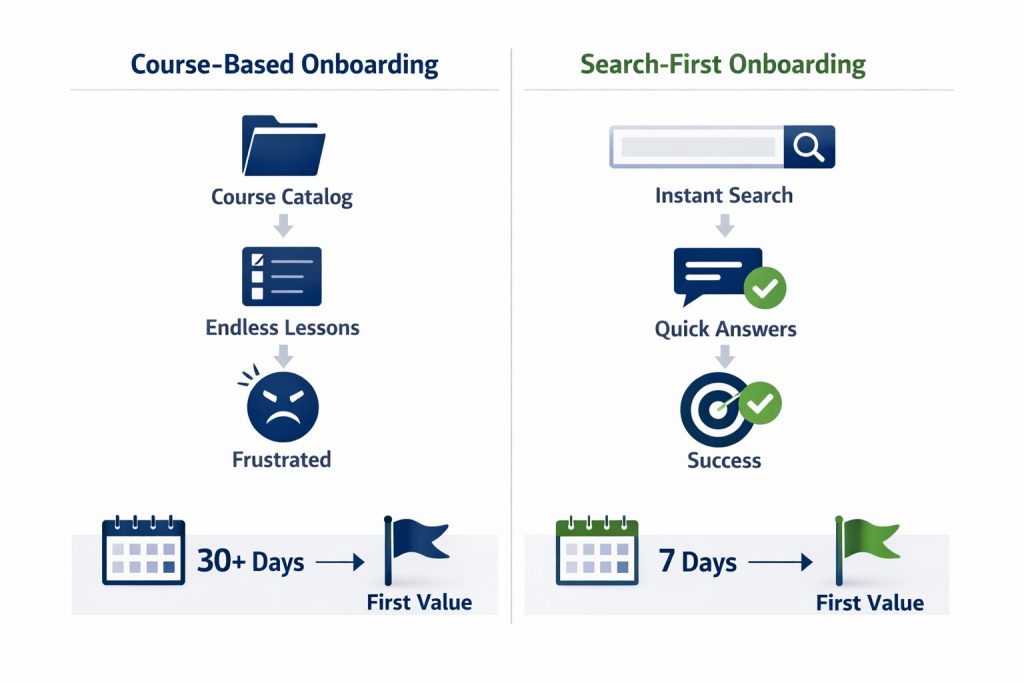
Traditional course-based onboarding assumes customers will browse catalogs, navigate courses, and remember where content lives. Customers don’t behave this way. They need instant answers mid-workflow, or the moment passes.
For a detailed exploration of these failure patterns and their hidden costs, see Why Customer Training Fails (And How Modern Platforms Fix It).
Why Progressive Onboarding Requires Search-First Access
The 30/60/90 framework only works if customers can access the right training at the moment they need it—not when you scheduled it.
The Search vs. Course Problem
Course-based onboarding says: “Browse the catalog, find the right course, navigate to the relevant section to find your answer.”
Search-first onboarding says: “Type your question. Get your answer in 5 seconds.”
When customers are blocked mid-task, they need immediate help. They won’t:
- Remember which course covered the topic
- Navigate through catalogs and lessons
- Watch a 15-minute video to find one answer
- Wait for a scheduled training session
They’ll either contact support (expensive), try workarounds that break things (risky), or abandon the task entirely (churn risk).
How Search-First Architecture Changes Onboarding
Scenario: Day 7 – SSO Configuration
Traditional approach: Customer searches internal help center for “SSO setup.” Returns zero results because the guide is titled “Authentication Configuration v3.2 – Enterprise.”
Search-first approach: Customer types “how do I set up single sign-on” into embedded training portal. Deep search understands intent, surfaces a 2-minute video showing exact SSO configuration steps. Problem solved. No support ticket. No frustration.
Scenario: Day 45 – Feature Discovery
Traditional approach: Customer doesn’t know automated reporting exists. It was mentioned briefly in a Week 1 onboarding session they’ve forgotten. Feature remains undiscovered.
Search-first approach: Customer searches “automate reports” or “schedule reports.” Instantly finds feature documentation and activation guide. Adopts advanced capability organically—no webinar required.
Why This Matters for Time-to-Value
Customers who can find answers mid-workflow:
- Reach activation milestones 40-50% faster
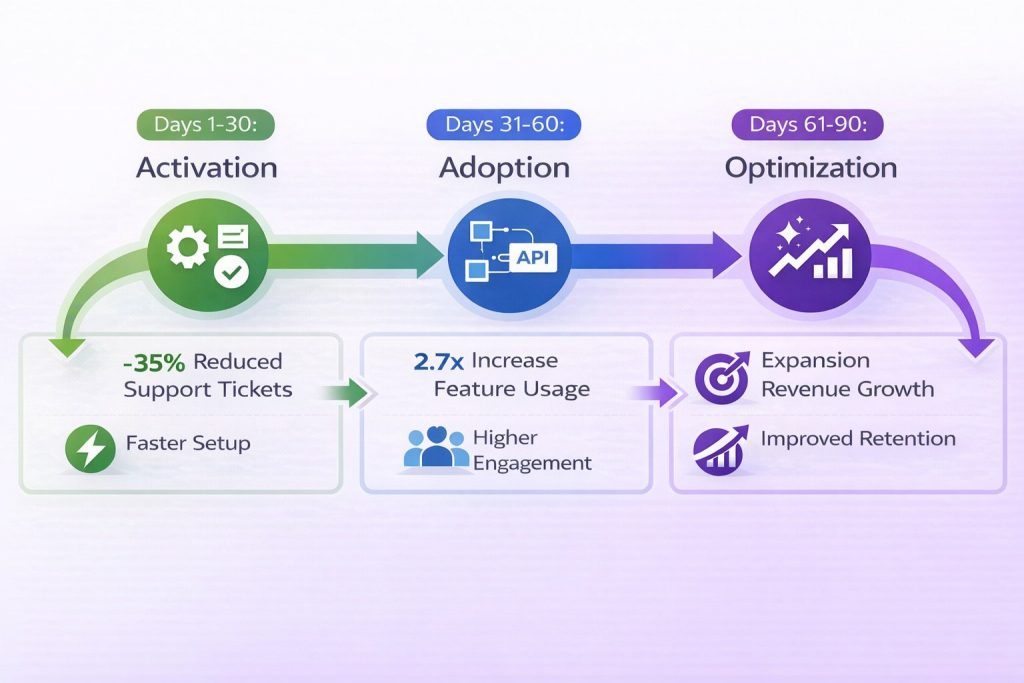
- Require 30-40% fewer support tickets during onboarding
- Adopt 2-3× more features in first 90 days
- Show 25-35% higher retention at Day 90
For detailed metrics on how to measure these outcomes, see Customer Training ROI: The Metrics That Actually Reduce Churn.
The Progressive Onboarding Framework: 30/60/90 Days
Effective customer onboarding training aligns content delivery with customer readiness across three distinct phases.
Phase 1: Days 1-30 — Activation
Primary Goal: Help customers reach their first meaningful outcome as quickly as possible.
What “Activation” Means:
Activation isn’t completing a checklist. It’s achieving a tangible result the customer couldn’t accomplish before using your product.
For a project management tool: Creating and completing a first project.
For an analytics platform: Generating a first custom report.
For a CRM: Logging a first customer interaction and tracking it through close.
Customers who activate within 7 days have 60-80% higher retention at 90 days compared to those taking 30+ days. Fast activation isn’t a nice-to-have. It’s the strongest predictor of long-term customer success.
Core Training Priorities (Days 1-30):
- Essential Setup (Days 1-3)
Customers can’t reach value if foundational setup blocks them.
Focus training exclusively on must-complete configuration:
- Account setup and access management
- Initial integrations or data connections
- Core settings enabling product functionality
- Permissions and security basics (for team/enterprise products)
Keep training task-oriented and minimal. Customers don’t need to understand why a setting exists. They need to configure it correctly and move forward.
Format: Step-by-step guides, short task-based videos (60-90 seconds), searchable help content.
Delivery: Embedded training portal accessible from within your product, setup checklists via email, contextual help pages customers can reference.
- Core Workflow Mastery (Days 4-14)
Once setup is complete, customers need to accomplish their first real task using the product’s primary workflow.
This is where activation happens—or doesn’t.
Training should focus on one workflow executed end-to-end:
- Creating their first [project/report/campaign/analysis]
- Understanding minimum required steps
- Seeing a complete outcome, not a partial demo
Avoid feature tourism. Customers don’t need to know every button. They need to complete one meaningful action proving the product works for them.
Format: Task-focused video tutorials showing real workflows with actual data when possible. If they’re building a dashboard, help them build their actual dashboard, not a sample one.
Delivery: Embedded training portal showing contextual tutorials, task-based onboarding emails, searchable help content answering specific workflow questions.
- Immediate Value Reinforcement (Days 15-30)
Customers who complete their first task still face a critical question: “Will this keep working?”
The goal in this window is reinforcement—helping customers repeat success independently.
Training priorities:
- Variations on core workflow (e.g., “You created one report. Here’s how to create a different type.”)
- Common troubleshooting (addressing errors customers typically encounter)
- Building confidence through repetition
Format: Contextual recommendations based on usage (“You created your first workflow. Want to learn how to automate it?”), FAQ content addressing common blockers, searchable troubleshooting guides.
Delivery: Behavioral email triggers, training portal always accessible for self-service problem-solving.
Success Metrics for Days 1-30:
Track outcomes, not activity:
- % of customers reaching activation milestone
- Median days to activation (target: <7 days)
- % requiring support intervention during setup
- Most-searched terms revealing content gaps
If median time-to-activation exceeds 10 days, onboarding training isn’t working. Something blocks progress—and search gap data reveals exactly what.
Phase 2: Days 31-60 — Adoption
Primary Goal: Expand product usage beyond core workflows into adjacent features that increase stickiness and reduce churn risk.
Customers who use only one feature remain fragile. They’re vulnerable to competitors, quick to churn when that single workflow changes, and unlikely to perceive high value.
Customers who use 3+ features show 40-60% lower churn and 2-3× higher expansion revenue. This phase builds that breadth.
Core Training Priorities (Days 31-60):
- Feature Discovery (Days 31-45)
Customers now understand basics. They’re ready to explore—but won’t do it randomly.
Training needs to surface relevant adjacent features based on what customers are already doing successfully.
If they’re creating reports manually → introduce automation.
If they’re managing projects individually → introduce team collaboration features.
If they’re analyzing data in-platform → introduce export and integration options.
The key: relevance over coverage. Don’t showcase every feature. Highlight the 2-3 features most likely to solve problems customers currently face.
Format: Contextual recommendations (“Based on your usage, here’s how to…”), use-case-specific content (“Advanced reporting for marketing teams”), optional learning paths building on existing knowledge.
Delivery: Email campaigns tied to feature milestones, training portals accessible for customers who proactively want to explore.
- Integration and Customization (Days 31-60)
As customers build confidence, they want the product to fit their workflows, not the reverse.
This phase introduces customization, integrations, and configurations personalizing the experience.
Training priorities:
- Connecting to tools customers already use (Slack, Salesforce, Google Workspace integrations)
- Customizing dashboards, views, or interfaces
- Setting up notifications, automations, or advanced workflows
Customers who integrate your product into their ecosystem become significantly stickier. They’ve invested configuration effort, increasing switching costs.
Format: Integration-specific guides, customization templates, troubleshooting for common integration issues.
Delivery: Content organized by integration type, embedded help accessible from settings pages, proactive recommendations based on customer tech stack (if known).
- Role-Based Learning (Days 45-60)
By now, usage patterns reveal customer roles and goals.
Training becomes more targeted:
- Admins see governance and permissions training
- End users see productivity and efficiency tips
- Developers see API documentation and advanced configurations
Role-based training dramatically increases relevance. Customers encounter only content applying to their responsibilities, reducing noise and increasing engagement.
Format: Personalized optional learning paths, role-specific content, materials tagged by role.
Success Metrics for Days 31-60:
Track breadth and depth:
- % of customers using 3+ features
- Feature adoption rate (trained vs. untrained cohorts)
- Integration completion rate
- Engagement with advanced content
If feature adoption remains flat despite training availability, content isn’t reaching customers at moments of readiness. Delivery timing or discoverability needs adjustment—usually the latter.
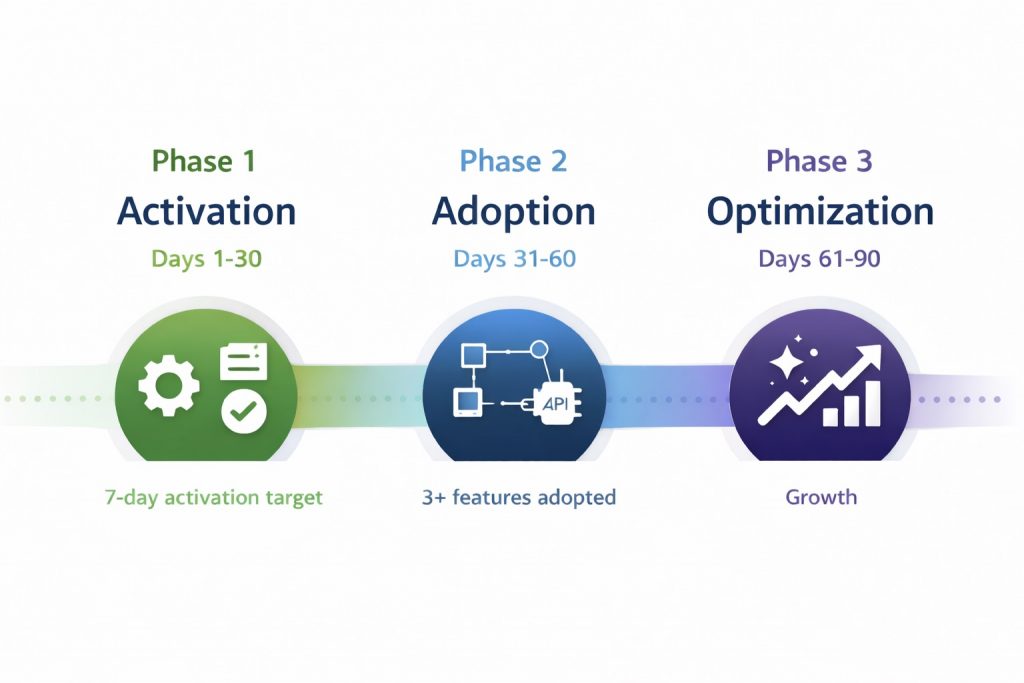
Phase 3: Days 61-90 — Optimization and Expansion
Primary Goal: Transition customers from competent users to confident power users who extract maximum value and become candidates for expansion.
By Day 60, customers have established usage patterns. This phase optimizes those patterns and introduces advanced capabilities driving expansion revenue and long-term retention.
Core Training Priorities (Days 61-90):
- Advanced Use Cases (Days 61-75)
Customers are now ready for training that was too complex at Day 10 but perfectly timed at Day 60.
This includes:
- Advanced workflows combining multiple features
- Optimization techniques (shortcuts, automation, bulk actions)
- Best practices from power users or customer success stories
Content is still practical but assumes baseline competence. Customers can follow along because they’ve mastered fundamentals.
Format: Advanced tutorials, case studies showing real customer workflows, webinars or live sessions for complex topics.
Delivery: Optional learning paths for customers who opt in, advanced content sections, email campaigns inviting customers to “take the next step.”
- Expansion Feature Training (Days 75-90)
Expansion happens when customers encounter needs their current plan or feature set can’t fully address.
Training plays a critical role in surfacing premium capabilities at the right moment.
If a customer is hitting usage limits → introduce enterprise plans.
If they’re manually repeating tasks → showcase automation features in higher tiers.
If they’re exporting data frequently → highlight advanced analytics add-ons.
This isn’t sales disguised as training. It’s genuinely helpful education acknowledging customers have outgrown their current configuration—and showing them how to solve that problem.
Format: Feature comparison content, upgrade impact calculators, case studies showing ROI of premium features.
Delivery: Contextual recommendations tied to usage patterns, emails triggered by behavior indicating readiness.
- Certification and Mastery Programs (Days 75-90) (Optional)
For customers who want formal recognition of expertise—especially in B2B contexts where certifications enhance credibility—offer optional mastery tracks.
Certifications work best for:
- Complex products where expertise is valued externally
- Partner or reseller ecosystems
- Enterprise customers where internal champions need credentials to advocate
Keep certifications optional. Most customers won’t pursue them. But for those who do, certifications increase engagement, loyalty, and advocacy.
Success Metrics for Days 61-90:
Track optimization and expansion signals:
- % of customers using advanced features
- Expansion conversation rate (for relevant customers)
- Certification completion (if offered)
- Customer health score improvement
Customers who reach Day 90 with strong feature adoption, low support dependency, and high engagement are significantly more likely to renew, expand, and refer.
Measuring Time-to-Value: The North Star Metric
Time-to-value (TTV) is the most important onboarding metric because it predicts retention more reliably than any other signal.
How to Define Your Activation Milestone:
An effective activation milestone is:
- Meaningful: Customers accomplish something that matters to them, not just to your product metrics
- Achievable quickly: Most customers should reach it within 3-7 days
- Measurable: You can track when it happens in product analytics
- Repeatable: Customers will do it again (not a one-time task)
Examples:
- Project management tool: Create and complete a project with at least 3 tasks
- CRM: Log 10 customer interactions and move one deal through a “custom pipeline stage.”
- Analytics platform: Create a custom dashboard with at least 3 data visualizations
- Communication tool: Send 50 messages and create one team channel
How to Measure Time-to-Value:
Track the median (not average) number of days from signup to activation milestone. Median is more reliable because it isn’t skewed by extreme outliers.
Benchmark Targets:
- Strong: Median TTV of 3-7 days
- Moderate: Median TTV of 8-14 days
- Weak: Median TTV of 15+ days
If median TTV exceeds 14 days, onboarding training isn’t effectively removing friction. Customers are getting stuck, and most won’t persist long enough to reach value.
What to Do When TTV Is Too Long:
Audit the activation path using search and support data:
- Where do customers drop off? (Identify exact step where most abandon)
- What support tickets appear in first 14 days? (Unaddressed blockers)
- What do customers search for but not find? (Content gaps preventing progress)
Fix the highest-friction points first. Often, improving one step (e.g., making API key setup clearer or searchable) can reduce median TTV by 30-40%.
Content Formats That Enable Progressive Onboarding
Effective onboarding training requires diverse formats matched to learning moments—all with one critical requirement: instant findability.
Task-Based Video Tutorials (Days 1-7)
Best for: Essential setup and first-time workflows.
Short, task-focused video tutorials (60-90 seconds) show customers exactly how to complete critical setup steps. Unlike long-form courses, these tutorials focus on one specific outcome: “Here’s how to connect your first integration” or “Here’s how to configure user permissions.”
Why they work: Customers learn by seeing exact steps, then immediately applying them. Videos under 2 minutes see 4-5× higher completion than 10+ minute walkthroughs covering the same content.
Modular Microlearning (Days 1-90)
Best for: On-demand answers to specific questions.
Modular content breaks training into small, independently consumable pieces (2-5 minutes each). Customers access exactly what they need without navigating irrelevant material.
Why they work: Customers don’t have time for courses. They need answers now. Modular content respects this reality.
Modules should be:
- Self-contained: Each module delivers complete value independently
- Reusable: The same module can appear in multiple optional courses or learning paths
- Accessible on-demand: Customers can find and consume them when needed
For more on how modular architecture solves discoverability and scalability challenges, see Modular Learning.
Embedded Training Portals (Days 1-90)
Best for: Delivering guidance exactly when and where customers need it.
Embedded help brings training into the product interface without requiring customers to leave their workflow. Using iframe embed, a searchable training portal can be accessed from within your product, help center, or support flows.
Examples:
- Training portal accessible from any product page
- Searchable knowledge bases embedded in settings or configuration areas
- Contextual content recommendations based on the page customers are viewing
Why it works: Eliminates context-switching. Customers don’t navigate to a separate portal, log in again, or lose their place. Training becomes instantly accessible without interrupting momentum.
For implementation strategies and real-world examples of embedded learning reducing support load, see Embedded Learning.
Email-Based Learning Campaigns (Days 1-90)
Best for: Progressive delivery of content aligned with usage milestones.
Email remains effective for onboarding when it’s triggered by behavior, not calendar dates.
Examples:
- Day 3 email (if activation hasn’t occurred): “Stuck on setup? Here’s help.”
- Post-activation email: “You created your first project. Here’s what’s next.”
- Feature adoption email: “Since you’re using reports daily, here’s how to automate them.”
Why it works: Emails reach customers outside the product, capturing attention when they’re not actively using it. Behavioral triggers ensure relevance.
Live or Recorded Webinars (Days 30-90)
Best for: Advanced topics, Q&A, and community building.
Webinars work well later in onboarding (Days 30+) when customers have context for advanced content and specific questions.
Live webinars allow real-time Q&A. Recorded webinars provide on-demand access for customers who can’t attend live.
Why they work: Human interaction builds trust and addresses nuance that written content can’t always capture.
Common Onboarding Training Mistakes (and How to Avoid Them)
Mistake 1: Teaching Everything Before Allowing Action
The Problem: Customers forced to complete 30-minute training before accessing the product abandon at high rates.
The Fix: Let customers act immediately. Provide training just-in-time when they encounter specific tasks. Make help accessible throughout the journey, not locked behind prerequisites.
Mistake 2: Identical Onboarding for All Customer Segments
The Problem: Enterprise admins and solo users receive the same content, frustrating both.
The Fix: Segment onboarding by role, team size, or use case. Deliver only relevant content. Let customers self-select what they need rather than being forced through irrelevant material.
Mistake 3: Measuring Completion Instead of Outcomes
The Problem: High course completion rates coexist with slow activation and rising support tickets.
The Fix: Track activation speed, feature adoption, support deflection, and content discovery success—not whether customers finished training. If customers can’t find what they need, training isn’t working regardless of completion metrics.
Mistake 4: Burying Critical Content in Course Structures
The Problem: A customer needs “How to configure SSO” on Day 7. That content exists somewhere in your training library. Customer can’t find it, contacts support instead.
The Fix: Make every piece of content independently accessible. Customers shouldn’t navigate course catalogs to find one answer. They should type their question and land on the answer in seconds.
Mistake 5: Neglecting Post-Activation Training
The Problem: Training “ends” after setup. Customers who need guidance for advanced features receive nothing.
The Fix: Ongoing training accessible throughout the customer lifecycle. Modern training architecture makes this scalable—customers find what they need when ready, without requiring scheduled sessions or manual CSM intervention.
Scaling Onboarding Without Scaling Headcount
The 30/60/90 framework remains effective whether you’re onboarding 10 customers or 10,000 because it’s designed for scalability.
How It Scales:
- Content is created once, consumed repeatedly. Modular training doesn’t require live delivery for each customer.
- Instant access eliminates manual routing. Customers find answers independently instead of waiting for CSM responses or support ticket resolutions.
- Behavioral triggers automate delivery. Customers receive training at the right moment without manual CS intervention.
- Analytics reveal bottlenecks proactively. Search gap analysis and drop-off detection show exactly what to fix before problems compound across hundreds of customers.
Companies implementing progressive onboarding typically see:
- 50-70% reduction in onboarding-related support tickets
- 30-50% faster median time-to-value
- 40-60% improvement in Day-90 feature adoption
These improvements happen without adding CS headcount. That’s the definition of scalable customer education.
Progressive Onboarding in Action
One pilot customer running an analytics platform faced a common problem: customers took 18 days (median) to generate their first custom report. Most never reached that milestone at all.
Their original onboarding approach: a 40-minute recorded walkthrough covering every feature, delivered on Day 1. Completion rate: 22%. Time-to-value: unchanged.
They restructured onboarding using the 30/60/90 framework:
Days 1-7: Task-based video tutorials for setup (under 2 minutes each). Then one activation goal: “Build your first report using this template.”
Days 8-30: Modular content accessible via embedded training portal. Customers could find answers without leaving the product interface. Typing “how do I filter by date range” landed them on specific 90-second tutorials.
Days 31-60: Feature discovery emails tied to usage. “You’ve created 5 reports. Here’s how to automate them.” Linked to automation guides.
Days 61-90: Advanced training (custom SQL queries, API exports) offered to power users. All content remained accessible for self-directed learning.
Results after 90 days:
- Median time-to-first-report: 6 days (67% improvement)
- % of customers creating 3+ reports: increased from 31% to 58%
- Support tickets about “how to build a report”: dropped 44%
- Day-90 retention: improved 12 percentage points
Content volume didn’t increase. Structure changed. Delivery timing changed. Outcomes transformed.
That’s the power of progressive onboarding built on accessible, modular training.
The Long-Term Impact of Better Onboarding
Customer onboarding training doesn’t just affect the first 90 days. It compounds over the customer lifetime.
Customers who activate quickly:
- Adopt more features over time
- Require less support intervention
- Refer other users more frequently
- Renew at higher rates
- Expand into higher-tier plans
The inverse is also true. Customers who struggle during onboarding rarely recover. Slow activation predicts churn more reliably than almost any other early signal.
Investing in onboarding isn’t about “making customers happy” in some abstract sense. It’s about establishing patterns of success that carry forward for months and years.
Progressive onboarding with instant access to the right guidance creates those patterns intentionally, predictably, and at scale.
For organizations ready to transform how customers learn, the 30/60/90 framework provides a proven starting point. It respects how customers actually learn, delivers training when it’s most relevant, and measures outcomes that matter.
That’s the difference between onboarding that feels complete internally and onboarding that actually works externally.
To explore the broader strategic context for customer training—including why traditional approaches fail and what modern platforms must deliver—see the Customer Training LMS: Strategy, ROI & Implementation Guide.
Beetsol’s Approach to Customer Onboarding Training
Beetsol is built for progressive onboarding where customers find answers in seconds, not courses.
How it works:
Deep search understands intent: Type “how do I set up SSO” and land on the exact 2-minute guide—regardless of where it’s organized. No catalog browsing required.
Modular content, flexible access: Training exists as independently consumable modules. Customers can access content directly, or follow optional recommended paths if they want structure. The same content serves both needs.
Embedded everywhere: Beetsol embeds directly into your product, help center, or support flows using iframe integration. Customers learn where they already work—no context-switching, no separate logins.
Actionable analytics: See what customers search for but can’t find (content gaps), where they drop off (friction points), and which training correlates with feature adoption. Optimize based on behavior, not guesswork.
The result: faster activation, higher adoption, and onboarding that scales without adding CS headcount.
See how Beetsol delivers customer training that actually gets used, or explore the complete platform capabilities powering progressive onboarding.
FAQ
What is customer onboarding training?
Customer onboarding training teaches customers how to use a product effectively during their first 90 days — focusing on activation (Days 1-30), adoption (Days 31-60), and optimization (Days 61-90).
Unlike employee training (forced courses), it’s search-first: customers find answers when stuck (“SSO setup,” “API limits”) rather than completing pre-loaded content they may never need.
For B2B SaaS companies, effective onboarding reaches activation in 3-7 days, feature adoption in 30-60 days, and full optimization in 90 days. Faster time-to-value correlates directly with higher retention.
How long should customer onboarding take?
Effective onboarding reaches initial activation in 3-7 days, feature adoption in 30-60 days, and optimization in 90 days. The timeline depends on product complexity, but faster time-to-value always correlates with higher retention.
What’s the difference between onboarding and training?
Onboarding is the first 30-90 days focused on activation and initial adoption. Training is ongoing education throughout the customer lifecycle. Onboarding is a subset of training, but training doesn’t end when onboarding does.
Why do customers abandon onboarding?
Customers abandon onboarding when it’s too long, too generic, disconnected from real tasks, or when they can’t find the specific help they need at the moment they need it. Front-loaded courses and identical content for all segments dramatically increase abandonment rates.
What’s the best format for onboarding training?
Modular, independently accessible content works best. Short task-based videos for setup (60-90 seconds), microlearning modules for specific questions, and embedded help accessible within the product outperform long courses or comprehensive tutorials that customers must complete sequentially.
How do you measure onboarding success?
Track time-to-value (days to activation milestone), feature adoption rate (percentage using 3+ features by Day 60), support ticket volume during onboarding, and Day-90 retention. These outcomes matter more than course completions.
Should onboarding be required or optional?
Core activation training should be accessible but not forced. Customers resent mandatory courses. Instead, use behavioral triggers to surface training when customers need it, and make content findable on-demand for self-directed learning.
What metrics indicate onboarding needs improvement?
Key warning signs: median time-to-value exceeding 14 days, customers repeatedly contacting support about topics covered in training, low feature adoption despite available training, high early churn (first 30-90 days), and training content with low utilization rates.
How does progressive onboarding differ from traditional onboarding?
Traditional onboarding delivers all content upfront in structured courses. Progressive onboarding delivers modular content aligned with customer readiness across 90 days—activation first (Days 1-30), then adoption (Days 31-60), then optimization (Days 61-90). Content is accessible on-demand rather than locked in sequences.
Can onboarding training scale without adding headcount?
Yes. Progressive onboarding with modular content, behavioral triggers, and embedded delivery scales effectively. Content is created once and consumed repeatedly. Customers find answers independently rather than requiring manual CSM intervention for every question. Companies typically see 50-70% reduction in onboarding-related support tickets.
