Customer success today hinges on how quickly and effectively customers can learn, adopt, and extract value from a product. As software becomes more complex, customers no longer tolerate trial-and-error learning. They expect instant answers, contextual guidance, and self-service options that fit their schedule.
This is where a modern customer training LMS becomes essential.
A customer training LMS enables businesses to educate customers at scale, reduce support dependency, and drive long-term retention. But here’s the uncomfortable truth: most companies have customer training. What they don’t have is customer learning.
The difference? Training measures what you delivered. Learning measures what customers actually use.
The average customer training program sees 20-30% completion rates. That means 70% of training content goes unused, not because it’s bad, but because customers can’t find what they need when they need it. The problem isn’t content volume. It’s content findability.
This guide covers everything from strategy and implementation to ROI and future trends, while showing why traditional approaches fail and what modern customer training LMS software must deliver to succeed.
What Is Customer Training?
Customer training is the structured process of educating customers on how to use a product or service effectively to achieve their desired outcomes. Unlike employee training, which focuses on job skills, compliance, and certifications, customer training prioritizes product adoption, feature utilization, and real-world problem-solving.
Customer training is continuous by nature. It starts with onboarding and extends through adoption, optimization, and expansion phases. A customer learning management system ensures this education is consistent, scalable, and measurable across every customer touchpoint.
Customer Training vs. Employee Training
The distinction matters because it shapes platform requirements:
Employee training assumes learners have time, motivation, and a mandate to complete courses. Training happens during work hours, completion is tracked for compliance, and certifications validate job readiness.
Customer training operates under opposite assumptions. Customers are impatient, self-directed, and only engage when they have a specific problem to solve. They won’t complete a 30-minute course to find one answer. They need that answer in 30 seconds, or they’ll contact support or abandon the task entirely.
This fundamental difference is why traditional LMS platforms, built for employees, consistently underperform for customer education.
Why Customer Training Is Crucial for Modern Businesses
Modern customers expect self-service learning, instant answers, and contextual guidance. When these expectations aren’t met, frustration increases and churn becomes inevitable.
Effective customer training helps businesses:
- Reduce reliance on support teams by enabling self-service problem-solving
- Improve product adoption rates through guided feature discovery
- Shorten time-to-value by accelerating onboarding and activation
- Strengthen customer loyalty by building confidence and competence
- Scale customer education without proportionally scaling headcount
Organizations using a structured customer training LMS are better equipped to scale growth without scaling support costs. One pilot customer in the B2B SaaS space reduced first-week support tickets by 38% after implementing search-first training, allowing their CS team to focus on expansion rather than basic product questions.
Why Traditional Customer Training Approaches Fail
Before understanding what makes a customer training LMS effective, it’s critical to understand why most training efforts underperform.
The Course Trap
Most companies organize training into courses because that’s how employee training works. But customers aren’t employees. They don’t have 30 minutes for a course. They have 30 seconds for an answer.
When training is locked in sequential courses, customers face a choice: spend 20 minutes watching irrelevant content to find one answer, or just ask support. Most choose support.
The data backs this up. Traditional course-based customer training sees 20-30% completion rates. The other 70% of customers either never start or abandon halfway through, meaning the majority of training investment delivers zero value.
The Folder Problem
Many companies create “Customer Resources” folders in Google Drive or Notion. Content exists, but customers can’t find it. Searching “SSO setup” returns nothing because the document is titled “Authentication Configuration Guide v3.2 Final.”
This isn’t a content problem. It’s a discoverability problem. And throwing more content at it makes it worse.
The Portal Trap
Traditional LMS platforms create separate training portals. Customers have to remember to visit them, log in separately, and navigate unfamiliar interfaces. By the time they complete all these steps, they’ve already messaged support or given up.
Context-switching kills engagement. If training doesn’t happen where customers already work, it simply won’t happen at all.
The Metrics Mirage
Most companies track course completions as their primary success metric. But completion doesn’t equal adoption. A customer can complete “Advanced Features Training” and never actually use advanced features.
What matters isn’t whether customers finished a course. It’s whether they found the answer that unlocked value.
These failure patterns are so common and costly that we’ve written an entire guide breaking down why customer training fails and the specific steps to fix each one. Learn more about why customer training fails →
What Is a Customer Training LMS?
A customer training LMS is a learning platform designed specifically for external users such as customers, partners, and clients. It delivers product education, onboarding, and ongoing learning in a centralized, scalable environment.
Unlike internal LMS platforms built for employee training, customer training LMS software prioritizes three things above all else:
- Findability – Customers must be able to search for and discover answers instantly
- Flexibility – Content must be consumable in any order, not locked in rigid sequences
- Accessibility – Training must be embedded where customers already work
When powered by AI, a modern customer training LMS adapts learning based on customer behavior, usage patterns, and real-time needs.
Customer Training LMS vs Traditional LMS
While both platforms deliver learning content, their purpose and design are fundamentally different.
Traditional LMS platforms are built for internal training, compliance tracking, and employee development. They prioritize administrative control, sequential course structures, and completion tracking.
Customer training LMS platforms are built for external users who need:
- Search-first architecture (not course catalogs)
- Modular content consumption (not sequential prerequisites)
- Embedded learning experiences (not separate portals)
- Product adoption insights (not just completion metrics)
The architectural difference isn’t subtle. Traditional LMS platforms organize content by courses, modules, and lessons. Customer training platforms organize content by questions, topics, and outcomes.
The former works for compliance. The latter works for adoption.
Key Benefits of a Customer Training LMS
A well-implemented customer training LMS delivers measurable value across customer experience, operational efficiency, and business growth.
1. Faster Customer Onboarding
Why it matters: The longer customers take to reach their first value moment, the higher the risk of early churn.
How it works: Structured onboarding programs using modular content help customers understand core features quickly without overwhelming them. Instead of forcing customers through a 2-hour “Getting Started” course, effective onboarding delivers 5-minute modules targeting specific activation milestones.
One pilot customer in the project management software space reduced average time-to-first-project-created from 8 days to 3 days by breaking their onboarding course into searchable, topic-specific modules that customers could consume in any order.
2. Improved Product Adoption
Why it matters: Most customers use only 20-30% of available features, leaving significant value unrealized and expansion revenue on the table.
How it works: Targeted learning paths and embedded training portal help customers discover and adopt advanced features progressively. When training is searchable and embedded, customers learn new capabilities exactly when they’re ready, not when you schedule a webinar.
Customer training LMS platforms with deep search capabilities enable customers to ask “How do I automate reports?” and land directly on the relevant module, regardless of which “course” contains that information.
3. Reduced Support Costs
Why it matters: Support teams spend 40-60% of their time answering repetitive questions that training should have addressed.
How it works: Self-service learning minimizes repetitive support tickets. When customers can search for and find answers in seconds, they don’t need to wait for support responses.
One pilot customer running a CRM platform saw support tickets about basic configuration drop by 35% within 60 days of implementing search-first training. Their support team shifted from answering “How do I…” questions to handling complex integration and customization requests.
4. Higher Customer Retention
Why it matters: Customers who don’t reach competence with your product will eventually churn, no matter how good your CSM relationships are.
How it works: Well-trained customers are confident customers. They understand how to solve problems independently, extract more value from the product, and are less likely to blame the tool when things go wrong.
Customer training LMS platforms that track skill development and feature adoption provide early warning signals when customers aren’t progressing, allowing CS teams to intervene before churn becomes inevitable.
5. Scalable Customer Education
Why it matters: You can’t scale customer education by adding more CSMs or running more live training sessions.
How it works: A customer training LMS allows businesses to educate thousands of users without increasing headcount proportionally. Content is created once and consumed repeatedly. Updates happen in one place and propagate instantly to all customers.
This is especially critical for companies scaling from 50 to 500+ customers. Without a scalable training system, customer success becomes a bottleneck that limits growth.
Essential Features of a Customer Training LMS
The effectiveness of customer education depends heavily on platform capabilities. Not all customer training LMS platforms are built equally.
1. Deep Search Functionality
Why it matters: If customers can’t find the answer in 30 seconds, they’ll contact support or give up. Traditional keyword search fails because customers don’t know your internal terminology.
“The Search Tax: The hidden cost paid by companies when customers cannot find answers within their training content. This “tax” is paid in the form of increased support tickets, wasted CSM time, and ultimately, customer churn.”
How it works: Deep search understands intent, not just keywords. A customer searching “how do I give someone access” finds results for “user permissions,” “invite team members,” and “role-based access control,” even though they didn’t use those exact terms.
Behind the scenes, AI indexes every Scorm file, PDF, and document. When a customer searches “SSO troubleshooting,” they land at the exact timestamp in a video where SSO issues are discussed, or the specific section of a guide that addresses their problem.
One pilot customer discovered that 47 customers had searched for “API rate limits” with zero results. They added a 2-minute explainer video. Searches dropped 80%, and support tickets about rate limits fell by a third the following month.
That’s the difference between keyword search and deep search.
2. Modular Learning Architecture
Why it matters: Customers won’t complete 30-minute courses, but they will complete 3-minute modules when they need specific information.
How it works: Modular learning means content exists independently and can be consumed directly. A customer can watch Module 5 first if that’s what they need right now, and their progress still counts toward any course or learning path that includes Module 5.
This respects how customers actually learn: non-linearly, driven by immediate needs, not predetermined sequences.
The same module can appear in multiple courses simultaneously. “API Authentication” might be part of both “Developer Onboarding” and “Advanced Integration” paths. Customers consume it once, and progress updates everywhere.
Traditional LMS platforms require content duplication for this flexibility. Modern customer training LMS software handles it automatically.
3. Embedded Learning Support
Why it matters: If training requires customers to leave your product, most won’t bother.
How it works: Embedded learning delivers training within the product interface or workflow. Customers learn without context-switching.
This can take several forms:
- Embedded training portal accessible from your product
- Help center that opens Beetsol content
- Training links in support ticket responses
- Searchable learning library embedded in your app
One pilot customer in the analytics software space embedded its Beetsol Training portal directly in their dashboard. When users need answers, they “Search” and watch a 90-second tutorial without leaving the environment. Feature adoption for previously underutilized capabilities increased 25% within 90 days.
4. AI-Powered Personalization
Why it matters: Enterprise customers and SMB customers have different learning needs. Without personalization, you’re either overwhelming SMBs with advanced content or boring enterprises with basics.
How it works: An AI-powered customer training LMS adapts content recommendations based on customer role, usage patterns, and behavior. An admin sees governance content. A developer sees API documentation. A power user sees advanced optimization techniques.
This happens automatically, without manual segmentation or duplicate content creation. The platform observes behavior and adjusts recommendations in real time.
5. Advanced Analytics and Reporting
Why it matters: You can’t optimize what you can’t measure. Traditional completion metrics don’t tell you if training is actually working.
How it works: Modern customer training LMS analytics go beyond “Who finished which course?” to answer:
- Where do customers drop off? (Which specific moments cause abandonment)
- What are customers searching for but can’t find? (Content gaps you need to fill)
- Which content correlates with product adoption? (What training actually drives outcomes)
- How does training performance differ by customer segment? (Enterprise vs SMB patterns)
These insights allow continuous improvement. Instead of guessing what training customers need, you know exactly what they’re looking for and whether your current content delivers.
Customer Training LMS Platform vs LMS Feature Comparison
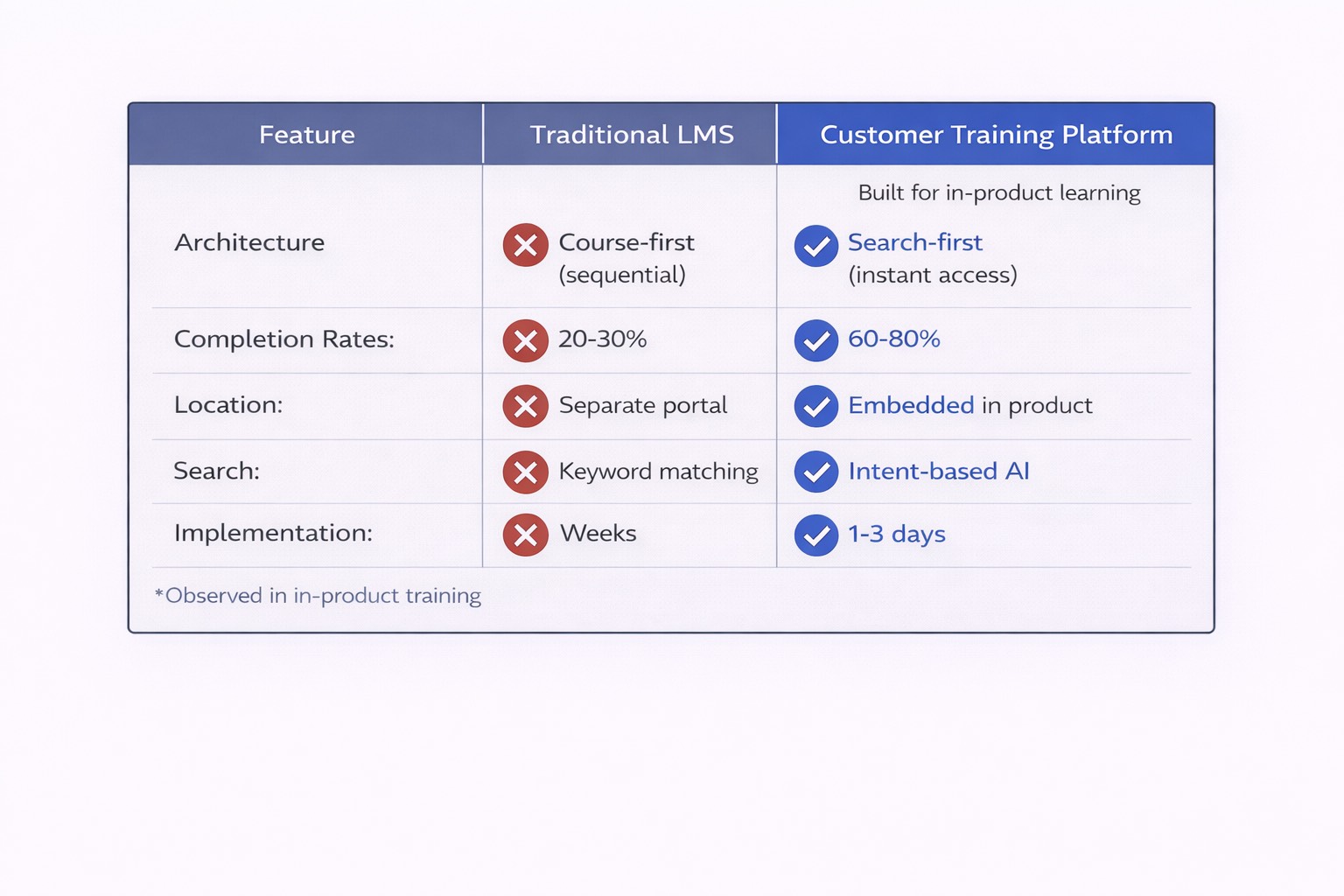
Understanding when you need a dedicated platform versus when LMS features suffice depends on scale, complexity, and strategic importance.
When LMS Features Are Sufficient
Use case: You have fewer than 50 customers, simple product workflows, and limited training content.
What works: Basic course hosting, video embeds, and PDF libraries. Your CRM or help desk might include enough learning functionality.
Limitations: As you scale, manual management becomes unsustainable. You’ll hit discoverability problems quickly.
When a Platform Becomes Necessary
Use case: You’re scaling from 50 to 500+ customers, seeing rising support tickets despite more documentation, or experiencing early churn due to activation issues.
What’s required: Search-first architecture, modular content, embedded experiences, and adoption analytics. These capabilities require a purpose-built customer training LMS.
Why it matters: At scale, the difference between 20% and 70% content utilization translates to hundreds of thousands in saved support costs and reduced churn.
When to Build vs Buy
Build only if customer training is your core competitive advantage (think Notion’s templates, Figma’s tutorials) and you have dedicated engineering resources. For most B2B SaaS companies, building takes 6-12 months and delays ROI.
Buy when you need results in weeks, not months. Modern customer training LMS platforms implement in 1-3 days and deliver measurable ROI within 90 days through support deflection and faster activation.
The opportunity cost of building is almost always higher than the cost of buying, especially when compounded by delayed results.
Content Types to Include in Customer Training
Effective customer training programs use a mix of content formats to support different learning preferences and use cases.
1. Video Tutorials
Best for: Demonstrating workflows, showing visual processes, onboarding walkthroughs.\
Why they work: Videos are engaging and easier to consume than dense text. A 2-minute screen recording can replace a 1,000-word guide.
Common mistake: Creating 15-minute videos that customers won’t finish. Instead, create 2-3 minute topic-specific videos that can be consumed independently.
2. Knowledge Base Articles
Best for: Step-by-step instructions, troubleshooting guides, reference documentation.
Why they work: Text is searchable, scannable, and quickly updated. Customers can skim for specific steps without watching entire videos.
Common mistake: Writing internal documentation and calling it customer training. Customer-facing content needs examples, context, and clear outcomes.
3. Step-by-Step Guides
Best for: Complex setup processes, multi-step workflows, feature configuration.
Why they work: Clear, numbered instructions help customers complete tasks without getting lost. When paired with screenshots or videos, they become self-service playbooks.
Common mistake: Writing guides that are too long. Break complex processes into multiple focused guides that customers can search for individually.
4. Microlearning Modules
Best for: Bite-sized lessons on specific topics, features, or concepts.
Why they work: Aligns with how customers actually learn. They need specific answers right now, not comprehensive courses for later.
Common mistake: Taking a 30-minute course and arbitrarily splitting it into 10 modules. Each module should stand alone and deliver complete value.
5. Certifications and Assessments
Best for: Power users, partner training, advanced use cases.
Why they work: Certifications create motivation for deep learning and signal expertise to employers or clients.
Common mistake: Requiring certifications for basic product usage. Save these for advanced users who want formal recognition.
Building an Effective Customer Training Strategy
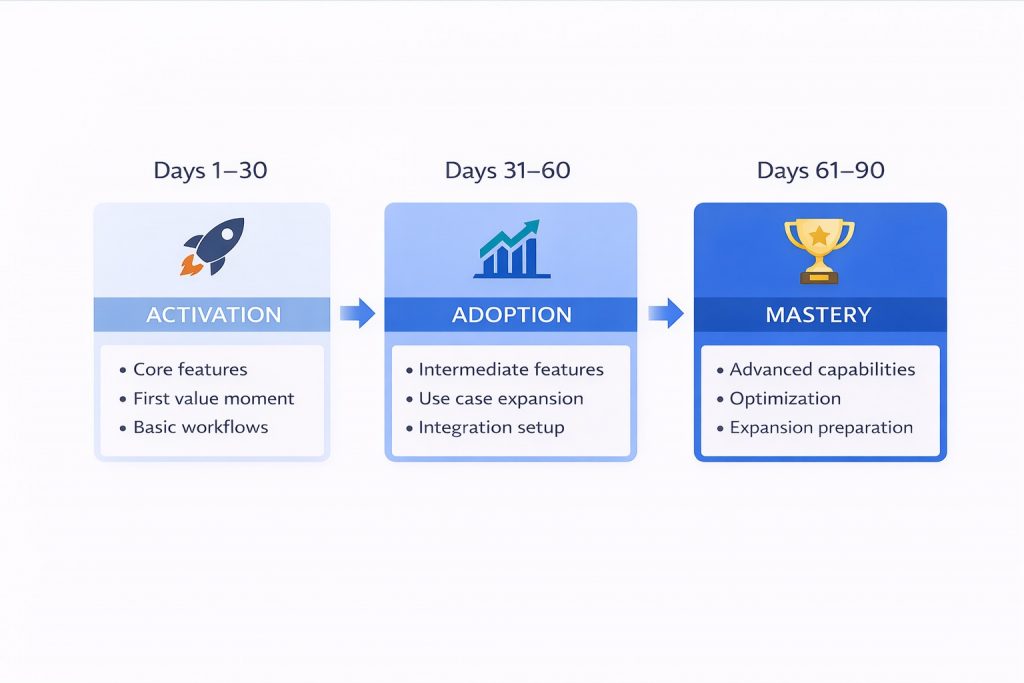
A strong strategy ensures training aligns with both customer needs and business goals.
Step 1: Define Customer and Business Goals
Customer goals: What outcomes do customers need to achieve? Faster activation? Specific use cases? Advanced capabilities?
Business goals: What does training need to drive? Reduced churn? Higher expansion? Lower support costs?
Common mistake: Building training around product features rather than customer outcomes. Customers don’t care about “Dashboard v2.0.” They care about “tracking project progress faster.”
Step 2: Understand Customer Journeys
Map learning needs across different lifecycle stages:
Days 1-30: Activation focus. Customers need to reach first value quickly. Training should target core workflows, not every feature.
Days 31-90: Adoption focus. Customers are ready to explore beyond basics. Training introduces intermediate features and use cases.
Days 90+: Optimization and expansion. Customers want advanced capabilities, integrations, and efficiency improvements.
Common mistake: Delivering all training upfront during onboarding. Progressive learning works better than front-loaded courses.
Step 3: Identify Key Learning Gaps
Use multiple data sources to find where customers struggle:
- Support tickets: What questions get asked repeatedly?
- Product analytics: Where do customers get stuck or abandon tasks?
- Search data: What are customers looking for but not finding?
- Customer feedback: What do CS teams hear in onboarding calls?
Common mistake: Assuming you know what customers need without validating with data. One pilot customer spent months creating advanced feature training only to discover customers were stuck on basic setup steps.
Step 4: Design Modular Learning Paths
Create flexible learning paths using modular content:
Recommended paths: Provide structure for customers who want guidance (“Start with these 5 modules”)
Open access: Allow customers to search and consume any content independently
Both approaches work with the same content. Customers choose their learning style.
Common mistake: Locking modules sequentially. If a customer needs Module 5, forcing them through courses with Modules 1-4 guarantees abandonment.
Step 5: Measure and Optimize Continuously
Track metrics that matter:
- Engagement: Are customers accessing training? Which content gets used?
- Completion: Are customers finishing modules? Where do they drop off?
- Adoption: Does training correlate with feature usage?
- Support deflection: Are tickets decreasing for trained topics?
Common mistake: Tracking only completion rates. A 90% completion rate means nothing if customers still contact support about covered topics.
For a detailed 90-day customer onboarding blueprint with week-by-week milestones, content templates, and measurement frameworks, see our complete onboarding guide. Get the blueprint →
Implementing a Customer Training LMS: Step-by-Step
Successful implementation requires planning and cross-functional collaboration.
Step 1: Align Internal Stakeholders
Who to involve: Product, support, customer success, marketing, and engineering teams.
Why it matters: Training touches every part of the customer journey. Without alignment, you’ll build training that doesn’t address real customer needs.
Common mistake: Treating training as a CS-only initiative. Product teams know where customers struggle. Support teams know what gets asked repeatedly. Include these perspectives.
Step 2: Select the Right LMS Platform
Evaluation criteria:
- Search-first architecture (not course catalogs)
- Modular content support (not forced sequential structures)
- Embedded learning capabilities (iframes, widgets, APIs)
- Analytics beyond completion rates
- Implementation timeline (days, not months)
Common mistake: Choosing based on feature checklists rather than architectural fit. A platform with 50 features you don’t need won’t outperform one with the 5 features that matter.
For customer training specifically, prioritize findability over course management. If customers can’t find content, it doesn’t matter how sophisticated your course builder is.
Step 3: Organize and Migrate Content
Structure content for search, not courses:
Don’t create “Module 3: Advanced Features.” Create content tagged with customer questions: “How do I set up SSO?”, “Why isn’t my webhook firing?”, “Where’s my API key?”
Common mistake: Migrating content from Google Drive using the same folder structure. This preserves the findability problem.
Better approach: Break long documents into topic-specific modules. Tag each with relevant skills or questions. Make everything independently searchable.
One pilot customer had a 45-minute “API Integration” course with 18% completion. They broke it into 8 searchable, 3-5 minute modules covering specific integration topics. Completion jumped to 67% because customers could find exactly what they needed.
Step 4: Integrate with Existing Systems
Key integrations:
- CRM: Trigger training based on customer lifecycle stage
- Support tools: Surface relevant training in ticket responses
- Product: Embed training contextually within workflows
- Analytics: Connect training completion to product usage data
Common mistake: Treating the customer training LMS as a standalone system. The most effective training is integrated into existing customer touchpoints.
Step 5: Launch, Monitor, and Iterate
Launch approach: Start with one customer segment or use case. Gather feedback. Refine. Then expand.
What to monitor:
- Search queries (what customers look for)
- Drop-off points (where customers abandon content)
- Support tickets (are trained topics still generating tickets?)
- Feature adoption (does training correlate with usage?)
Common mistake: Launching training and assuming it’s done. Effective customer training requires continuous optimization based on customer behavior.
Once implementation is complete, the focus shifts to scaling self-service learning and reducing support dependency. Learn how to build self-service customer training that actually works →
Measuring Success and ROI of Customer Training LMS
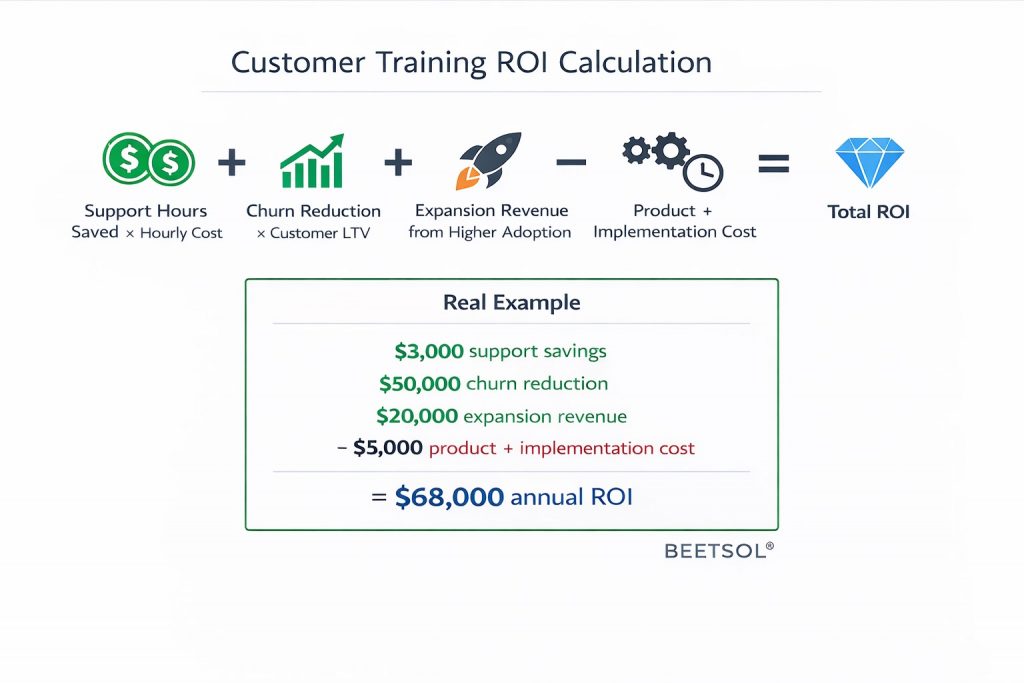
Success metrics go beyond course completions. Here’s how to calculate real impact.
Framework for Customer Training ROI
ROI Formula:
ROI = (Support Hours Saved × Hourly Cost) + (Churn Reduction × Customer LTV) + (Expansion Revenue from Higher Adoption) – (Platform Cost + Implementation Time)
Key Metrics to Track
1. Support Ticket Deflection
What to measure: Reduction in tickets about topics covered in training.
Benchmark: Companies with search-first training typically see 20-40% deflection within 90 days.
Example calculation: A 300-person B2B SaaS company receives 50 support tickets/week about basic product usage. Each ticket takes 30 minutes to resolve. At $40/hour fully loaded cost, that’s $40,000 annually.
A 30% reduction saves $12,000/year. Over 3 years, that’s $36,000 in direct support cost savings alone.
2. Time-to-Value
What to measure: Days from signup to first meaningful product usage.
Benchmark: Effective customer training reduces time-to-value by 30-50%.
Why it matters: Faster activation directly correlates with lower early churn. Customers who reach value quickly are 3x more likely to remain customers after 90 days.
3. Feature Adoption Rate
What to measure: Percentage of customers using features covered in training vs. those not trained.
Benchmark: Trained customers typically use 2-3x more features than untrained customers.
Why it matters: Higher feature adoption drives expansion revenue and reduces churn. Customers extracting more value are more likely to renew and upgrade.
4. Content Utilization Rate
What to measure: Percentage of training content that actually gets consumed.
Benchmark: Course-based training: 20-30% utilization. Modular, search-first training: 60-80% utilization.
Why it matters: Content that doesn’t get used delivers zero ROI. Higher utilization means your training investment is actually working.
5. Customer Retention Rate
What to measure: Churn rate for trained vs. untrained customers.
Benchmark: Well-trained customers show 10-25% lower churn.
Example calculation: For a $100K average customer lifetime value and 100 customers at risk annually, a 15% churn reduction saves $1.5M over 3 years.
ROI Timeline Expectations
Months 1-3: Implementation and content migration. Early support deflection begins (10-20% reduction).
Months 4-6: Optimization based on usage data. Support deflection increases (20-30%). Time-to-value improvements become measurable.
Months 7-12: Full ROI realization. Support deflection stabilizes (30-40%). Feature adoption and retention impacts become clear.
Most companies see positive ROI within 3-6 months when measuring support cost savings alone. When including churn reduction and expansion revenue, ROI becomes significant within the first year.
What Good Looks Like
One pilot customer in the marketing automation space implemented search-first customer training and tracked these results over 6 months:
- Support tickets about onboarding dropped 42%
- Average time to first campaign created fell from 12 days to 5 days
- Customers completing training used 2.7x more features than untrained customers
- Early churn (first 90 days) decreased by 18%
Their customer training LMS cost $800/month. Support cost savings alone exceeded $3,000/month. The ROI was undeniable.
For a deeper breakdown of customer training ROI metrics, calculation templates, and benchmarking data across different company sizes, see our complete ROI guide. Explore the ROI framework →
Future Trends in Customer Training LMS
Customer training is shifting toward intelligence-driven learning ecosystems. Here’s what’s coming.
AI-Driven Personalization at Scale
Static learning paths are being replaced by dynamic, behavior-based content delivery. AI observes how individual customers interact with your product and automatically surfaces relevant training before they ask for it.
Example: A customer repeatedly trying to use an advanced feature incorrectly triggers an automatic notification: “We noticed you’re working with custom fields. Here’s a 2-minute guide on field types and validation rules.”
Embedded Learning as the Default
Separate training portals will become the exception, not the rule. Customers expect training embedded directly in product workflows, help centers, and support interactions.
Platforms that require customers to “go somewhere else to learn” will struggle to maintain engagement.
Search as the Primary Interface
Course catalogs are being replaced by search-first interfaces. Customers increasingly expect to type a question and get an immediate, specific answer, not a list of courses to browse.
Deep search capabilities that understand intent and context will separate effective customer training LMS platforms from ineffective ones.
Proactive Learning Recommendations
Customer training will shift from reactive (customer searches) to proactive (platform anticipates need). Based on product usage patterns, lifecycle stage, and historical data, the LMS will automatically recommend next steps.
Example: A customer completes basic reporting. The system proactively suggests “Ready to automate reports? Here’s how to set up scheduled exports.”
Analytics Beyond Completion
Training analytics will focus on business outcomes, not learning activities. The question won’t be “Did they finish the course?” but “Did training improve their product usage, reduce support dependency, or increase expansion likelihood?”
Customer training LMS platforms that can’t connect learning to business outcomes will lose relevance.
Why Use Beetsol LMS for Customer Training
Beetsol is built as a skill-first, search-driven platform specifically designed for modern customer education. It combines modular learning, embedded experiences, and deep search into a single system.
How Beetsol Works Differently
Content-first, course-optional architecture: Upload existing videos, documents, Scorm files, slides, and presentations. Beetsol auto-tags everything and makes it instantly searchable. No reformatting required. Customers can consume content independently (search-first) or as part of structured learning paths (for those who want guidance). Either way, progress rolls up automatically with no manual tracking.
Search over courses: When a customer types “how do I set up SSO?”, they find the answer in seconds, regardless of which “course” contains that information. Deep search understands intent, not just keywords, delivering accurate results based on what customers actually need.
Insights that matter: Beetsol doesn’t just show completion rates. The platform reveals where customers drop off, what they search for but can’t find, and which content correlates with product adoption. These insights drive continuous improvement.
Real Results from Pilot Customers
One pilot customer in the B2B SaaS space discovered that 47 customers had searched for “API rate limits” but found no matching content. They added a single 2-minute video. Searches dropped 80%, and support tickets about rate limits fell by a third the following month.
Another pilot customer running a project management platform broke their 45-minute onboarding course into 8 searchable modules. Completion rates jumped from 18% to 67% because customers could find exactly what they needed without watching irrelevant sections.
Built for Scale
Beetsol enables organizations to build scalable, AI-powered customer training that grows with their product and customer base. Whether you’re onboarding 50 or 5,000 customers, the platform delivers consistent, searchable, measurable learning experiences without requiring proportional increases in CS headcount.
For businesses looking for the best customer training LMS, Beetsol delivers both intelligence and simplicity.
Customer Training as a Competitive Advantage
Customer training is no longer optional. It’s essential for growth, retention, and product success. A modern customer training LMS transforms education from a cost center into a strategic asset.
With the right platform, businesses can reduce support costs by 30-40%, improve product adoption by 2-3x, and create confident customers who stay longer and expand faster.
The companies winning in customer education aren’t the ones with the most training content. They’re the ones with the most findable, usable, actionable training.
Beetsol enables organizations to build exactly that: customer training that customers actually use because they can find what they need, when they need it, without friction.
FAQ
What is customer training?
Customer training is teaching customers how to use a product effectively so they reach value faster, adopt more features, and rely less on support.
Why does customer training fail?
- Course-based structure: Customers won’t complete 45-minute videos. Industry average: 20-30% completion. 70-80% abandon before finishing.
- Poor search: Customer searches “SSO setup,” finds nothing (or finds a long course), opens support ticket instead. Training exists but isn’t findable.
- Wrong metrics: Measuring completion rates instead of ticket deflection or adoption. A customer who completes all training but still opens tickets = training failed.
For B2B SaaS companies specifically: Training fails when content is titled using internal terminology (“SAML Authentication Configuration”) but customers search using their language (“SSO setup”). Without search that understands intent, training becomes invisible.
How is customer training different from self-service support?
Self-service support answers questions reactively. Customer training proactively builds competence so customers don’t need to ask.
When should companies invest in customer training platforms?
Invest when you hit one of these inflection points:
For any company:
- Customer growth outpaces onboarding capacity
- Support tickets rise despite creating more documentation
- Early churn increases due to “product too complex” feedback
For B2B SaaS companies specifically:
- CS team spends 40%+ of time answering “how-to” questions (not driving expansion)
- Customer onboarding takes 30+ days to first value
- Support ticket volume grows faster than revenue
- Early churn (first 90 days) exceeds 15% with “product complexity” cited as reason
These signals indicate training exists but isn’t working — usually because it’s not searchable or findable when customers need it.
Should companies build or buy customer training software?
Buy, unless you’re building a training product yourself.
Build costs:
- Search infrastructure: $50K-150K (6-12 months eng time)
- Content management system: $30K-80K (3-6 months)
- Analytics and reporting: $20K-50K (2-4 months)
- Embedded delivery: $30K-70K (3-6 months)
- Total: $130K-350K in eng time, 9-18 months to production
Buy timeline:
- Modern platforms: Go live in 1-3 days
- ROI visible in 60-90 days (support ticket deflection, faster onboarding)
For B2B SaaS companies: Focus your eng team on your core product, not training infrastructure. Platforms like Beetsol cost $6.5K-35K/year — far less than engineering opportunity cost.
What is customer training ROI?
ROI comes from reduced support costs, faster activation, higher feature adoption, and lower churn. Many teams see positive ROI within 3-6 months.
How do you implement customer training effectively?
Use a 30/60/90-day approach: activation first, then adoption, then mastery. Keep content modular, searchable, and embedded where customers work.
Customer training platform vs. LMS – what’s the difference?
LMS tools are built for employees and compliance. Customer training platforms are search-first, modular, embedded, and focused on product adoption, not course completion.
