Customer training doesn’t fail because teams don’t care.
It fails because it’s built on assumptions that don’t match how customers actually behave.
Most SaaS and product companies invest heavily in customer education. They create onboarding decks, record walkthrough videos, publish help articles, and even launch full training academies. On paper, everything looks right.
Yet the outcomes tell a different story.
Customers still get stuck. Support tickets keep rising. Onboarding takes longer than expected. Feature adoption stalls. Early churn appears quietly, often without a single dramatic failure.
The problem isn’t effort.
It’s structure.
Customer training is still designed as if customers learn like employees: patiently, sequentially, and with time set aside to “complete” training. Customers don’t learn this way. They learn under pressure, in short bursts, while trying to get real work done.
When training doesn’t reflect that reality, it stops working — regardless of how much content exists.
📝 Updated April 2026: Added diagnostic framework, company stage analysis, and before/after benchmarks
The Hidden Cost of Broken Customer Training
When customer training fails, the impact isn’t isolated to the learning function. It ripples across the business.
- Support teams answer the same questions repeatedly
- Customer success teams spend time unblocking basics instead of driving outcomes
- Product teams see features underused without understanding why
- Churn increases, often attributed to vague reasons like “low engagement” or “poor fit”
What makes this especially frustrating is that the knowledge already exists. The answers are written down. The videos are recorded. The courses are live.
The failure isn’t a lack of information.
It’s that the information isn’t usable at the moment customers need it.
When training can’t be accessed in context, customers don’t experience it as help. They experience it as friction.
Is Your Customer Training Actually Failing? The 5-Minute Diagnostic
Before fixing customer training, diagnose what’s actually broken. Most companies mistake symptoms for root causes. Use these five diagnostic questions to identify your specific failure mode.
Diagnostic Question 1: What’s Your True Adoption Rate?
Don’t measure course completions. Measure content utilization:
- How many customers accessed ANY training content last month?
- Divide by total active customers
- Under 40% = enrollment gate problem (customers won’t enroll to access content)
- 40-60% = findability problem (customers can’t find what they need)
- 60%+ = you’re doing better than most (but check ticket data)
This metric reveals whether training exists but goes unused (under 40%), or whether customers are accessing training but not finding answers (40-60%).
Diagnostic Question 2: Where Do Customers Drop Off?
Check your analytics to identify the exact abandonment point:
- Abandon after searching? Search quality problem (can’t find relevant content)
- Abandon after finding a course? Enrollment friction (won’t commit to full course for one answer)
- Abandon mid-course? Content problem (irrelevant, too long, or poorly structured)
- Complete but still open tickets? Relevance problem (training doesn’t address real use cases)
The abandonment point tells you what to fix. Most companies discover customers abandon at the enrollment gate — they find a relevant course but won’t enroll just to access one module.
Diagnostic Question 3: What Are Customers Searching For But Not Finding?
If you don’t have search gap data, you’re flying blind. This is the most valuable diagnostic:
- Export all support tickets from last 30 days
- Categorize by topic (SSO setup, API integration, permissions, etc.)
- Cross-reference with training content
- Gap = what’s asked repeatedly but not documented (or not findable)
Example: If 15 customers this month asked ‘how do I bulk import contacts’ and you have a comprehensive import guide, the problem isn’t content — it’s discoverability. Customers couldn’t find what exists.
Diagnostic Question 4: Support Tickets for Documented Topics
Pull support tickets for the last month and measure documented vs undocumented questions:
- Over 40% about documented features = training exists but customers can’t find it (search/navigation problem)
- 20-40% about documented features = training is partially working but has gaps
- Under 20% about documented features = training is working (most tickets are legitimate edge cases)
This metric separates “we need more content” from “we need better access to existing content.” Most companies discover they don’t have a content gap — they have a discoverability gap.
Diagnostic Question 5: Time-to-First-Value by Training Engagement
Segment customers by training engagement and compare activation speed:
- Did not access training: Average X days to first meaningful product usage
- Accessed training: Average Y days to first meaningful product usage
If X ≈ Y: Training isn’t working (no correlation between training and activation)
If Y < X by 40%+: Training is working (customers who engage with training activate faster)
This measures whether training actually drives outcomes or just exists as a checkbox. Many companies discover that customers who “complete” training activate at the same pace as those who skip it entirely — revealing that training content doesn’t match real activation needs.
Your diagnosis determines your fix. A findability problem requires better search. An enrollment problem requires modular access. A content problem requires better documentation. Most teams skip diagnosis and implement generic “improvements” that don’t address root causes.
For a complete framework on diagnosing why customer training consistently delivers only 20-25% adoption across course-first platforms, see our analysis: Why Your Customer Training Academy Has 25% Adoption (And What Actually Works).
Common Customer Training Failure Modes
Across SaaS and product companies, customer training tends to fail in the same predictable ways.
1. PDFs That Get Lost Immediately
PDFs remain a staple of customer education: setup guides, configuration manuals, troubleshooting documents, and best-practice playbooks.
The problem isn’t quality. It’s discoverability.
Once a PDF is uploaded to a drive, attached to an onboarding email, or buried inside a portal, customers rarely find it again. When a question arises weeks later, they don’t search folders or re-open old emails. They open a support ticket.
Over time, PDFs multiply, drift out of date, and become referenced inconsistently by different teams. What was meant to enable self-service turns into internal tribal knowledge — accessed primarily by support and success teams rather than customers themselves.
2. Videos That Go Unwatched (or Unfinished)
Training videos are often treated as a modern fix for documentation. In practice, they introduce a different problem.
Most customer training videos are:
- Too long for a specific question
- Too broad to be immediately useful
- Difficult to search inside
- Detached from the exact task the customer is trying to complete
If a customer needs one answer at minute 3:12, a 20-minute video becomes friction. Even well-produced videos are opened once, skimmed briefly, and abandoned.
Internally, the content feels “done.”
Externally, it feels unusable.
3. Courses That Get Abandoned
Courses are inherited from employee training models, where learners are expected to follow a structured sequence from start to finish.
Customers don’t behave this way.
They don’t want to enroll, complete prerequisites, or navigate a curriculum just to unblock a task. They want to solve a problem right now.
As a result, course completion rates remain low. Training appears “complete” internally but unused externally. Content becomes a checkbox rather than a capability.
These failure patterns stem from a fundamental architectural mismatch between course-based platforms and voluntary learner behavior. The 25% adoption ceiling isn’t about content quality — it’s about enrollment gates creating friction at every step.
Customer Training Failure Patterns by Company Stage
Training problems evolve as companies scale. What fails at 50 customers differs from what fails at 500. Recognizing your stage-specific failure mode helps you prioritize the right fixes.
Startups (0-50 Customers)
Most common failure: No systematized training at all. Knowledge exists in scattered Google Docs, Loom videos in Slack threads, and tribal knowledge held by early team members.
Symptom: Every customer asks the same questions. CS team answers manually each time.
Root cause: Haven’t systematized knowledge yet. Still treating training as one-to-one communication rather than one-to-many documentation.
Fix priority: Start with a searchable knowledge base, not courses. Capture answers as you give them. Make everything searchable. Don’t build curricula yet — just make knowledge accessible.
Growth Stage (50-200 Customers)
Most common failure: Built comprehensive courses but nobody completes them. Training exists but goes unused.
Symptom: 15-20% course completion rates despite investing heavily in content quality. Support tickets remain high for documented topics.
Root cause: Enrollment gate friction. Customers won’t commit to 30-minute courses to find one answer. This is the 25% adoption plateau that affects all course-first platforms regardless of content quality.
Fix priority: Make content searchable without enrollment. Break courses into independently accessible modules. Remove the requirement to “enroll” before accessing specific answers.
Scale Stage (200-1,000 Customers)
Most common failure: Training exists and customers want to use it, but they can’t find what they need when they need it.
Symptom: High support ticket volume for documented features. Customers say “I couldn’t find this in training” even though comprehensive documentation exists.
Root cause: Poor search and buried content. Training is organized by internal structure (Course 1, Module 3) rather than customer questions (“How do I set up SSO?”). Keyword search fails because customers use different terminology than documentation.
Fix priority: Deep semantic search that understands intent, not just keywords. In-product embedding so training surfaces exactly where customers work. Search gap analytics to identify what customers look for but can’t find.
Enterprise (1,000+ Customers)
Most common failure: Training is comprehensive but overwhelming. Too much content, no personalization, customers don’t know where to start.
Symptom: Customers say “there’s too much information” or “I don’t know what applies to me.” Engagement is low despite extensive content libraries.
Root cause: One-size-fits-all approach at enterprise scale. Small customers see advanced features they don’t need. Enterprise customers can’t find power-user content buried among basics.
Fix priority: AI-driven content recommendations based on customer role, product usage, and company size. Personalized learning paths that surface relevant content automatically. Progressive disclosure that reveals advanced capabilities as customers demonstrate readiness.
Understanding your stage helps you avoid premature optimization. Don’t build enterprise personalization when your real problem is basic discoverability. Don’t invest in advanced analytics when you haven’t systematized knowledge yet.
For companies in the 50-500 customer range where activation speed matters most, the architectural difference between course-first and search-first platforms becomes critical. Explore why: Usage-Based SaaS Requires AI-Speed Adoption.
Knowledge Decay and the Inconsistent Customer Experience
Even when customer training works initially, it rarely stays effective.
Products evolve. Interfaces change. Features are renamed, redesigned, or reconfigured. Training content struggles to keep pace. Older guides circulate alongside newer ones. Different teams reference different materials.
Customers receive different answers depending on which resource — or person — they encounter first.
Over time, support becomes the unofficial source of truth. Customers stop trusting training systems and start relying on humans. Consistency erodes, confidence drops, and the experience becomes harder to repair as the customer base grows.
Why Customer Training Breaks After Onboarding
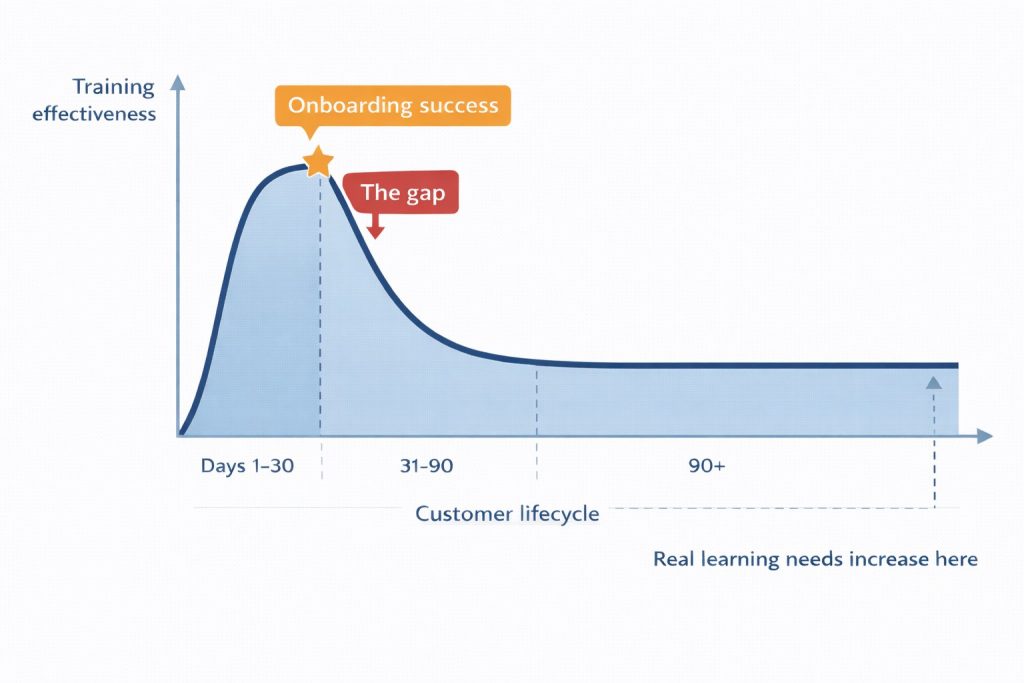
Most customer training programs look successful in the first 30 days.
New customers attend onboarding calls. They watch intro videos. They complete setup checklists. Early metrics appear healthy.
Then real usage begins.
Customers move beyond basics into edge cases, integrations, permissions, and workflows that weren’t covered in linear onboarding material. Their questions become more specific and more urgent.
At this stage, training systems that worked during onboarding stop being useful.
Without ongoing, searchable, task-level training, customers revert to trial-and-error or support tickets. Training effectively “ends” after onboarding — even though learning needs actually increase over time.
This gap between initial success and long-term enablement is one of the most common drivers of frustration, slow adoption, and silent churn.
How Support Quietly Becomes the Training System
When customer training fails, support fills the gap.
Customers submit tickets not because issues are complex, but because answers are easier to get from a human than from training content. Support agents become knowledge routers, answering the same “how do I” questions repeatedly.
Over time, this creates hidden costs:
- Knowledge becomes trapped in people instead of systems
- Answers vary by agent, creating inconsistency
- Simple questions consume time meant for real issues
- Support burnout increases due to repetition
Support teams were never designed to be training platforms. But without effective customer training, they become one by default — at far higher cost and with far less scalability.
For a deep-dive on building self-service training that actually prevents this, see Self-Service Customer Training That Reduces Support Load.
The Hidden Support Load: Ghost Tickets
Not all customer friction shows up as a support ticket.
Many failures never get reported at all. A customer searches for an answer, doesn’t find it, and gives up. No ticket is filed. No alert is triggered. No dashboard changes.
These are ghost tickets — moments of friction that remain invisible.
Instead of asking for help, customers:
- Use the product incorrectly
- Abandon a feature entirely
- Quietly reassess whether the product is worth the effort
Ghost tickets are more dangerous than visible support load because they compound silently. Each failed search increases frustration without generating feedback. By the time churn appears, the root cause is already weeks or months old.

Traditional training systems are blind to this. They don’t show what customers searched for, whether they found an answer, or where discovery broke down.
So teams optimize for what they can see — ticket data — while missing the larger failure: customers who never bothered to ask.
The Hidden Cost of Context Switching
Another overlooked reason customer training fails is context switching.
Training usually lives in a separate portal. Work happens inside the product. Customers must leave what they’re doing, navigate elsewhere, search again, learn, then return and apply the knowledge.
Each step introduces friction.
Even motivated customers abandon learning when it’s disconnected from action. Content can be accurate, well-written, and comprehensive — and still go unused because it appears at the wrong moment, in the wrong place.
When learning requires interruption, it competes with real work. Real work always wins.
Why These Problems Get Worse as You Scale
Customer training challenges compound with growth.
What works for 20 customers breaks at 200. What works for 200 collapses at 2,000.
As scale increases:
- One-to-one onboarding becomes impossible
- Support volume grows faster than headcount
- Training updates lag behind product releases
- Teams lose visibility into where customers struggle
Without a scalable model, growth amplifies confusion instead of value.
Why “More Content” Is the Wrong Fix
When customer training underperforms, the default response is predictable.
Another guide. Another video. Another course.
This rarely helps.
More content increases search friction, cognitive overload, and maintenance burden. Customers don’t want more information. They want the right answer, at the right moment.
Adding content without fixing access simply deepens the problem.
The Content Maintenance Paradox
Customer training doesn’t just fail at delivery. It fails at maintenance.
Every product change creates a tax:
- Videos need re-recording
- Courses need restructuring
- Screenshots become outdated
- Entire lessons become misleading
Course-based systems magnify this cost. When one screen changes, an entire walkthrough becomes suspect. Updating a single step requires touching everything around it.
Over time, teams either burn out maintaining content or stop updating it altogether. Accuracy erodes. Trust follows.
Systems built around small, focused answers age more gracefully. Updating one module is easier than redoing an entire course. Maintenance becomes manageable, not overwhelming.
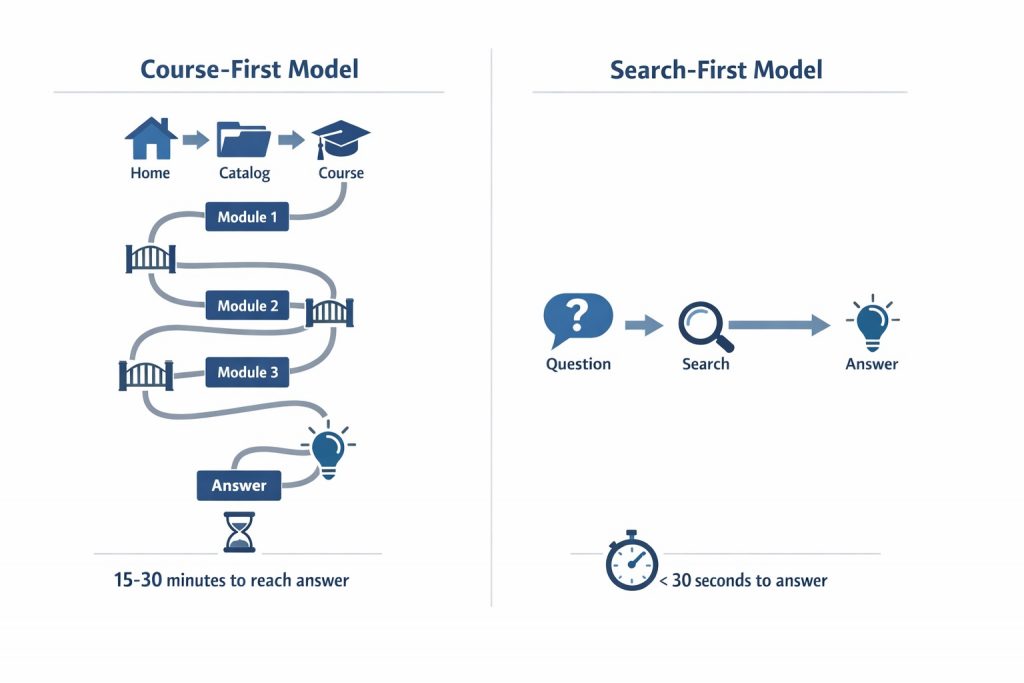
The Core Structural Problem: Search vs. Courses
Courses assume linear learning, time investment, and planned progression. Customers operate in short sessions, under pressure, with non-linear workflows.
When training systems prioritize navigation over discovery, customers are forced to adapt to the system instead of the system adapting to them.
That’s when training stops being helpful.
Search-first access changes this dynamic entirely. It allows customers to ask questions in their own words and get immediate, relevant answers — without committing to a path they never intended to follow.
This isn’t just a feature difference — it’s an architectural difference that determines adoption outcomes. The distinction between AI-native search-first platforms and traditional course-first LMS systems with retrofitted search features matters more than any individual feature comparison. For complete analysis: The AI Promise vs. Reality in B2B SaaS Customer Training.
Why Traditional Training Metrics Hide the Real Problem
Many teams believe customer training is working because dashboards show enrollments and completions.
These metrics are misleading.
Completion doesn’t mean comprehension. Enrollment doesn’t mean usage. A customer can “finish” training and still be blocked when real work begins.
Without visibility into failed searches, drop-offs, or repeated questions, teams assume success while customers continue to struggle.
False confidence delays fixes — and allows friction to persist unnoticed.
This measurement gap explains why companies continue investing in course-first training despite 20-25% adoption rates. The metrics show “engagement” (enrollments, completions) while masking the real problem: 75% of customers never engage because content isn’t findable when they need it. For a comprehensive framework on measuring outcomes that actually matter, see our guide: Customer Training Strategy & ROI.
What Fixed Training Looks Like: Before/After Metrics
Recognizing training failure requires understanding what success actually looks like. Here are the measurable differences between failing training (typical of course-first platforms) and working training (search-first architecture).
These aren’t aspirational benchmarks — they’re real outcomes from companies that shifted from course-first to search-first training architecture. The difference isn’t content quality. It’s how content is organized, accessed, and delivered.
The Customer Autonomy Truth
There’s a psychological difference between being taught and finding an answer.
When customers are taught, success feels external: “They showed me how.”
When customers find the answer themselves, success feels internal: “I figured it out.”
That difference matters.
Self-discovery builds confidence. Confidence builds trust. Trust builds loyalty.
Customers who can unblock themselves feel capable, not dependent. They’re more likely to explore advanced features, experiment with workflows, and persist through complexity.
Training that respects autonomy earns trust. Training that demands patience loses it.
What Needs to Change
So if courses, PDFs, and portals all fail for structural reasons — what works instead?
The answer isn’t a better version of the same model. It’s a different model entirely.
Modern customer training platforms organize knowledge around questions, tasks, and outcomes — not courses.
Customers search before they browse. Learning happens in small, focused moments. Content is modular and reusable. Access is frictionless. Insights matter more than completions.
Training becomes on-demand knowledge rather than a curriculum to finish.
Customer Training Isn’t Broken — The Model Is
Customer training works when it’s designed around how customers actually learn:
- Searching instead of navigating
- Consuming small, relevant pieces
- Learning in the context of real work
- Improving content based on observed friction
When platforms align with this reality, training stops being a cost center and starts driving real outcomes — faster onboarding, fewer support tickets, and higher product adoption.
Beetsol is built around this reality.
Customers search before they browse. They need answers in seconds, not courses to complete.
Beetsol makes every module independently searchable and accessible — so training adapts to how customers actually learn.
See how Beetsol’s search-first architecture, modular delivery, and embedded learning work together to eliminate training friction.
The result: training that gets used, not ignored.
See how Beetsol fixes customer training friction →
To measure whether your training is actually working, see Customer Training ROI: The Metrics That Actually Reduce Churn.
FAQ
Why does customer training fail?
Three failure patterns:
1. Course-based structure: Customers won’t complete 45-min videos (20-30% completion). Training exists but isn’t consumed.
2. Poor search: Customer searches “SSO,” finds nothing (or finds wrong content), opens ticket. Training exists but isn’t findable.
3. Wrong metrics: Measuring completion, not ticket deflection or adoption. Completion doesn’t equal capability.
For B2B SaaS companies: Most failure is terminology mismatch. Your training says “SAML Authentication Configuration,” customer searches “SSO setup,” finds nothing. Without intent-based search, customers assume training doesn’t exist — even when it does.
Semantic deep search solves the discoverability problem by matching customer intent to content, regardless of terminology mismatches.
What are the biggest customer training challenges?
Poor discoverability, low engagement with long videos or courses, outdated documentation, and the lack of insight into where customers struggle.
Why doesn’t more training content help?
More content increases complexity without improving findability. Without search-first access, it often creates more confusion.
How is modern customer training different?
Modern customer training is search-first, modular, and insight-driven, allowing teams to fix friction instead of guessing.