Choosing customer training software shouldn’t feel like shopping for enterprise resource planning systems. Yet most B2B SaaS companies face exactly that complexity when evaluating platforms: hundreds of features, opaque pricing, months-long implementations, and vendor promises that rarely match reality.
This guide cuts through the noise. We’ve analyzed the top customer training platforms used by B2B SaaS companies in 2026, examining actual pricing (where available), implementation timelines, ideal customer profiles, and real-world use cases. Whether you’re a 50-customer startup or a 5,000-customer enterprise, you’ll find the right platform for your specific needs.
For broader context on building effective customer training programs, see our complete customer training LMS guide.
What Makes Great Customer Training Software in 2026?
Before comparing specific platforms, let’s establish evaluation criteria that actually matter for B2B SaaS customer training.
The Core Requirements
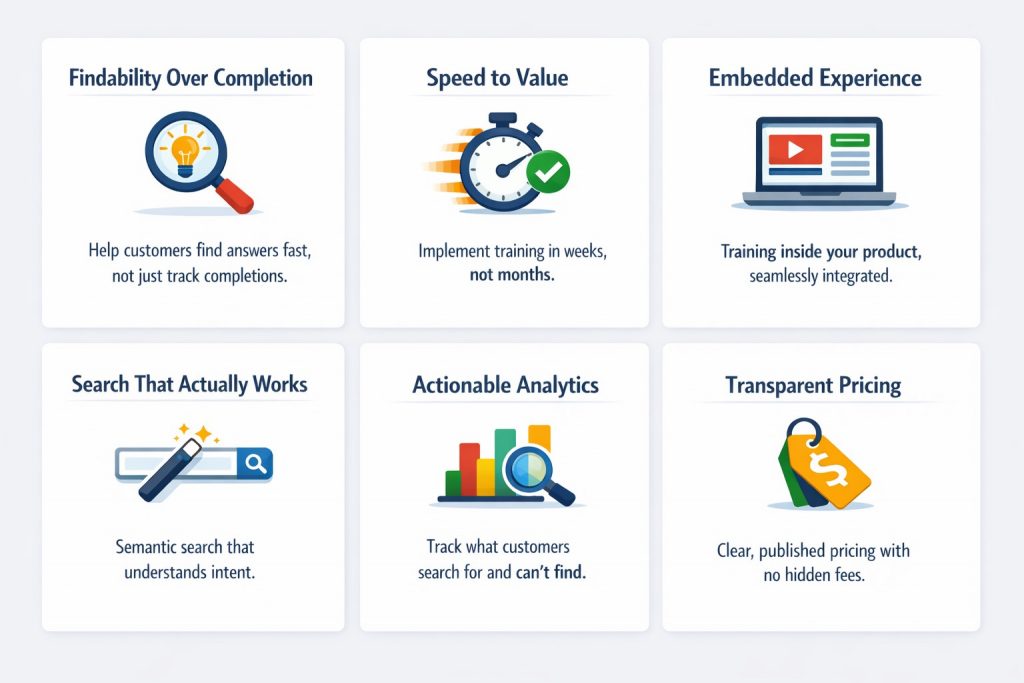
- Findability Over Completion
Great customer training software helps customers find answers in seconds, not track course completions. The metric that matters: Did the customer resolve their question? Not: Did they finish Module 2?
- Speed to Value
Implementation shouldn’t take longer than customer onboarding. If your platform takes 6 months to implement, customers have already churned before training goes live.
- Embedded Experience
Training that lives inside your product converts better than separate academies requiring new logins. Context-switching kills engagement. Customers don’t want to navigate branded portals — they want answers without leaving their workflow.
- Search That Actually Works
Keyword search fails because customers don’t know your terminology. Semantic search understands intent: “how do I give someone access” finds “User Permissions” even without keyword match. The difference between keyword and semantic search is the difference between 20% and 80% content utilization.
- Actionable Analytics
Knowing 27% of customers completed a course doesn’t help improve training. Knowing what customers search for but can’t find does. Intent resolution tracking beats completion tracking.
- Transparent Pricing
Quote-based pricing adds 2-3 months to your buying cycle. Published pricing lets you evaluate ROI immediately.
What Doesn’t Matter as Much as Vendors Claim
- Gamification: B2B SaaS customers don’t want badges, they want answers
- Social learning: Fine for employee training, rarely used in customer education
- Advanced reporting: Most reports go unread; focus on actionable insights instead
- Certification management: Only matters if you’re building formal programs
- Elaborate UI customization: Customers prefer finding answers fast over navigating beautiful portals
Platform Comparison at a Glance
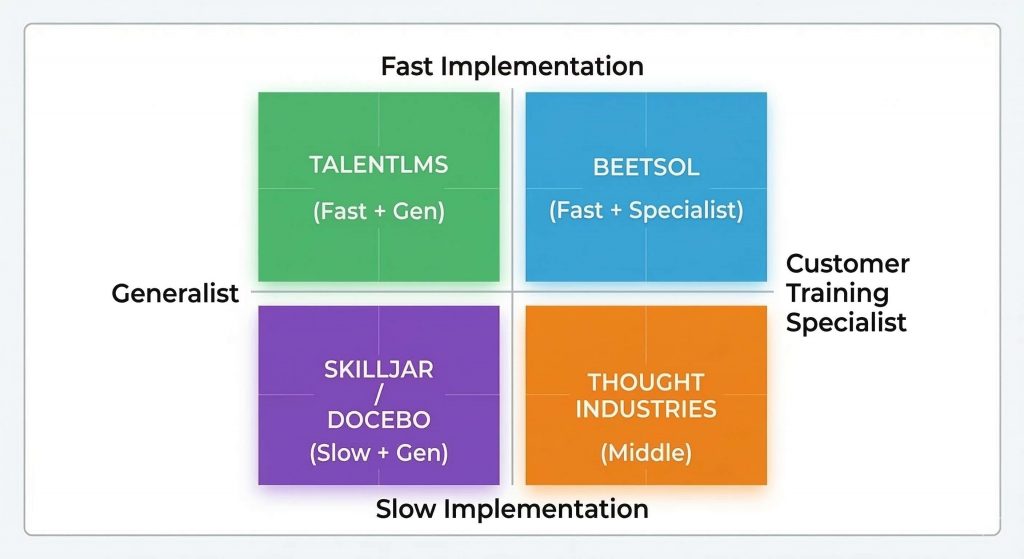
Quick reference for busy decision-makers comparing the top 10 customer training platforms:
| Platform | Core Architecture | Implementation | Starting Price | Best For |
|---|---|---|---|---|
| Skilljar | Course-first, white-label | 2-6 Months | $30K-$150K+(quote-based) | Enterprise academies |
| Docebo | Course-first, AI-powered | 3-6 Months | $25K-$200K+(quote-based) | Global enterprises, compliance |
| Beetsol | Search-first + optional courses | 1-3 Days | $6,500/year | Fast activation, Ticket reduction |
| Thought Industries | Course-first, flexible API | 2-4 Months | $25K-$40K (quote-based) |
Mid-market with API needs |
| Absorb LMS | Course-first, multi-Audience | 2-3 Months | $20K-$50K (quote-based) |
Employees + customers + partners |
| TalentLMS | Course-first, lightweight | Days-1 Week | $69-$429/month | Small businesses, budget |
| LearnUpon | Course-first, simple | 2-4 Weeks | $599+/month | SMB, straightforward needs |
| Lessonly | Course-first, sales focus | 2-4 Weeks | Quote-Based | Sales enablement, internal |
| 360Learning | Course-first, collaborative | 1-2 Months | Quote-Based | Peer-to-peer learning |
| Moodle | Course-first, open-source | Varies | Free (+ hosting/dev costs) | Technical teams, customization |
The Top 10 Customer Training Platforms (2026)
Detailed analysis of each platform, organized by category.
Category 1: Enterprise Platforms
1. Skilljar — Best for Enterprise SaaS (1,000+ Customers)
Ideal for: Large enterprises needing branded academies, complex organizational structures, and formal training programs
What it excels at:
Skilljar dominates the enterprise customer training market for good reason. The platform handles massive scale, complex hierarchies, and sophisticated course management better than any competitor. Built for enterprises with dedicated training teams, Skilljar provides comprehensive course authoring, learning path management, and detailed analytics. The platform’s white-label capabilities mean enterprise customers can maintain brand consistency across customer academies.
Skilljar is adding AI features (content recommendations, automated tagging) to their existing course-based architecture. The core platform still organizes learning around courses, modules, and learning paths.
Key features:
- Enterprise-grade infrastructure (thousands of concurrent users)
- Comprehensive course management and authoring
- White-label multi-tenant academies
- Advanced SSO and security
- Deep CRM integrations
- Certification management
- AI-powered content recommendations
Pricing: Quote-based, typically $30,000-$50,000+ annually for mid-market, $60,000-$150,000+ for enterprise
Implementation timeline: 2-4 months (mid-market), 4-6 months (enterprise)
Best for:
- Fortune 500 enterprise customers
- Complex organizational hierarchies
- Formal certification programs
- Companies with dedicated training teams
Challenges:
- Course-first architecture (customers must navigate structure to find answers)
- Long implementation timelines
- Pricing complexity and high cost for mid-market
- Separate academy creates context-switching
For a detailed comparison, see our Skilljar alternative guide.
2. Docebo — Best for Global Enterprises with Compliance Needs
Ideal for: Large global organizations needing multi-language support, AI-powered features, and extensive compliance tracking
What it excels at:
Docebo is the most feature-rich LMS platform available. With AI-powered content recommendations, automated tagging, predictive analytics, and support for 40+ languages, Docebo serves massive global enterprises effectively. The platform’s learning commerce capabilities also enable organizations to monetize training through course sales, certifications, and subscriptions.
Docebo has invested heavily in AI, including generative AI tutors with source citations and sophisticated UI customization tools. For organizations with complex, multi-language, multi-region training needs, this breadth of capability is unmatched.
Key features:
- AI-powered content recommendations and personalization
- Multi-language support (40+ languages)
- Learning commerce (sell courses, certifications)
- Advanced compliance and audit tracking
- Extensive integration ecosystem (500+ connectors)
- Sophisticated experience builders and UI customization
Pricing: Quote-based, typically $25,000-$60,000+ annually for mid-market, $80,000-$200,000+ for enterprise
Implementation timeline: 3-6 months
Best for:
- Global enterprises (multi-language requirements)
- Regulated industries (healthcare, finance, manufacturing)
- Organizations monetizing training
- Companies needing extensive customization
Challenges:
- Overwhelming complexity for simple use cases
- Very high total cost of ownership
- Long implementation and configuration
- Steep learning curve for administrators
For a detailed comparison, see our Docebo alternative guide.
Category 2: Search-First Architecture
3. Beetsol — Best for Mid-Market B2B SaaS (50-500 Customers)
Ideal for: Mid-market SaaS companies needing faster customer activation, support ticket reduction, and self-service learning
What makes it different:
Beetsol is the only platform that combines search-first architecture with traditional course support — you’re not forced to choose between the two.
The core is search-first: upload existing videos, PDFs, SCORM, and documentation. Beetsol’s AI automatically indexes everything using vector embeddings (think of it as teaching the system to understand what content means, not just what words it contains). Customers type questions and get direct answers — no course enrollment, no prerequisites, no navigation.
The platform’s semantic search understands intent, not just keywords. When customers search “how do I let someone access my account,” they find “User Permissions,” “Invite Team Members,” and “Role Management” even without exact keyword matches.
But here’s the unique part: when you need structured learning paths — onboarding workflows, certification programs, compliance training — Beetsol supports traditional courses too. Content that’s part of a course has progress automatically roll up. You get both immediate search access AND structured progression when it matters.
How the AI works (without the jargon):
When a customer searches, the system: (1) finds the most relevant documentation using semantic understanding, (2) processes it through a secure layer that only uses your verified content, (3) returns a concise answer with a direct link to the source. You see both the summary AND the exact documentation it came from.
This means the system never makes up answers. If your documentation is wrong, you fix the source once and all future answers are corrected. Compare this to AI tutors that generate responses from general knowledge — those can be 95% correct but that 5% causes real configuration failures and support tickets. We call this the Hallucination Tax.
Key features:
- Semantic search with vector embeddings (understands meaning, not just keywords)
- AI-generated summaries linked to verified source content
- Search-first access PLUS traditional courses (unique hybrid)
- 1-3 day implementation (vs 2-6 months for competitors)
- Embedded learning (lives in your product/help center)
- Intent resolution tracking (did they find their answer?)
- Search gap analytics (what customers look for but can’t find)
- Works with legacy content as-is (no restructuring needed)
Pricing:
- Starter: $6,500/year (up to 100 active learners)
- Growth: $15,500/year (up to 250 active learners)
- Scale: $27,000/year (up to 500 active learners)
- Monthly payment available · All features included · No hidden fees
View complete pricing details →
Implementation timeline: 1-3 days
Best for:
- Faster customer activation (30-50% time reduction)
- Reducing support tickets (typical 25-40% reduction)
- Self-service learning (customers search before they browse)
- Companies with existing content that just needs to be findable
- Companies that need speed (can’t wait 3-6 months)
Not ideal for:
- Formal certification programs generating revenue
- Multi-language requirements (40+ languages)
- Complex compliance tracking
Real results (pilot data): Mid-market SaaS companies typically see 60-80% content utilization (vs 20-30% industry average), 30-40% support ticket reduction, and ROI within 3-6 months.
Category 3: Mid-Market Course Builders
4. Thought Industries — Best for Mid-Market with API Needs
Ideal for: Mid-market companies needing flexible content delivery and strong API capabilities
What it excels at:
Thought Industries sits between Skilljar’s enterprise focus and simpler platforms, offering flexibility without overwhelming complexity. The platform’s robust API and integration capabilities appeal to companies with engineering resources. Course-based at its core, with strong customization options for companies that have dev resources to leverage them.
Key features:
- Flexible content delivery (courses, paths, standalone resources)
- Strong REST API for custom integrations
- Native e-commerce functionality
- White-label customization
- Learning analytics
Pricing: Quote-based, typically $25,000-$40,000 annually
Implementation timeline: 2-4 months
Best for:
- Mid-market companies with engineering teams
- Organizations needing custom integrations
- Partner training programs
- Companies monetizing certification programs
Challenges:
- Still course-focused architecture
- Pricing not transparent
- Requires engineering resources to leverage API fully
For a detailed comparison, see our Thought Industries alternative guide.
5. Absorb LMS — Best for Multi-Audience Training
Ideal for: Companies training employees, customers, and partners in one platform
What it excels at:
Absorb LMS handles multiple audiences (employees, customers, partners) in one platform. Good for companies that genuinely need unified training across different groups. Course-based architecture with multi-audience management.
Key features:
- Multi-audience management (separate portals per audience)
- Good course authoring tools
- Mobile learning
- Decent reporting
Pricing: Quote-based, typically $20,000-$50,000 annually
Implementation timeline: 2-3 months
Best for:
- Companies actively training multiple audiences
- Mid-market with diverse training needs
Challenges:
- Tries to do everything (master of none)
- Course-based architecture
- Not optimized specifically for customer training
For a detailed comparison, see our Absorb LMS alternative guide.
Category 4: Budget-Friendly SMB Options
6. TalentLMS — Best for Small Businesses (Budget-Conscious)
Ideal for: Small companies (under 50 customers) needing basic LMS functionality at affordable price
What it excels at:
TalentLMS offers straightforward LMS functionality at accessible pricing. No enterprise features, no unnecessary complexity — just basic course delivery.
Key features:
- Simple course creation
- Basic reporting
- Gamification elements
- Mobile app
Pricing: $69-$429/month depending on users
Implementation timeline: Days to 1 week
Best for:
- Very small companies (under 50 customers)
- Budget-constrained teams
- Basic training needs
Challenges:
- Limited search functionality
- Not built for B2B SaaS customer training specifically
- Basic analytics
- Doesn’t scale well beyond 100-200 users
7. LearnUpon — Best for Small to Mid-Market (Simple Needs)
Ideal for: Growing companies needing straightforward LMS without enterprise complexity
What it excels at:
LearnUpon offers clean interface and reasonable pricing for basic course delivery. Good for companies that need “LMS 101” without advanced features.
Key features:
- User-friendly interface
- Basic course management
- Good customer support
- Straightforward reporting
Pricing: Starts around $599/month, scales with users
Implementation timeline: 2-4 weeks
Best for:
- Small to mid-market companies
- Basic training requirements
- Teams wanting simplicity
Challenges:
- Limited advanced features
- Basic search functionality
- Not built specifically for B2B SaaS
Category 5: Internal / Sales Training Tools
8. Lessonly (Seismic Learning) — Best for Sales Training
Ideal for: Companies primarily focused on sales enablement and internal employee training (less ideal for customer education)
What it excels at:
Lessonly (now part of Seismic) excels at sales enablement and employee onboarding. Simple interface, easy content creation, and practice scenarios work well for internal teams.
Key features:
- Simple, intuitive interface
- Quick content creation
- Practice and role-play scenarios
- Sales enablement focus
Pricing: Quote-based
Implementation timeline: 2-4 weeks
Best for:
- Sales team training
- Employee onboarding
- Internal L&D programs
Challenges:
- Not optimized for external customer training
- Limited search capabilities
- Better for internal teams than B2B customers
9. 360Learning — Best for Collaborative Learning
Ideal for: Companies emphasizing peer-to-peer learning and collaborative content creation
What it excels at:
360Learning focuses on collaborative learning where subject matter experts create and share content. Works well for internal teams where knowledge sharing matters.
Key features:
- Collaborative authoring
- Peer learning emphasis
- Reaction and feedback tools
- Modern interface
Pricing: Quote-based
Implementation timeline: 1-2 months
Best for:
- Companies valuing collaborative learning
- Organizations with distributed expertise
- Teams emphasizing peer-to-peer education
Challenges:
- Better for internal teams than customers
- Collaborative model doesn’t fit all customer training needs
- Course-based structure
Category 6: Open-Source / Technical
10. Moodle — Best for Open-Source / Technical Teams
Ideal for: Technical teams comfortable with self-hosting and customization
What it excels at:
Moodle is the leading open-source LMS. Massive plugin ecosystem and complete customization control appeal to technical teams with development resources.
Key features:
- Open-source (free to use)
- Extensive plugin ecosystem
- Complete customization control
- Large community
Pricing: Free (open-source), but requires hosting, maintenance, and development resources
Implementation timeline: Varies widely (weeks to months depending on customization)
Best for:
- Technical teams with development resources
- Organizations wanting complete control
- Budget-constrained with technical capability
Challenges:
- Requires significant technical resources
- Total cost often exceeds commercial options (hosting, development, maintenance)
- Dated user experience
- Not optimized for B2B SaaS customer training
How to Choose the Right Platform for Your Company
With 10+ viable options, choosing the right platform requires a structured evaluation process.
Step 1: Define Your Primary Goal
Ask: What outcome matters most?
- Faster customer activation → Search-first platform (Beetsol)
- Build formal certification programs → Course-focused enterprise LMS (Skilljar, Docebo)
- Reduce support tickets by 30%+ → Search-first platform (Beetsol)
- Monetize partner training → E-commerce-enabled platform (Docebo, Thought Industries)
- Multi-language global training → Enterprise platform (Docebo)
- Launch quickly (under 1 month) → Fast implementation platform (Beetsol, TalentLMS, LearnUpon)
Your primary goal eliminates 60-70% of options immediately.
Step 2: Match Platform to Company Size
Under 50 customers:
- TalentLMS (budget-friendly)
- Beetsol Starter (search-first)
50-500 customers:
- Beetsol (search-first, fast)
- LearnUpon (simple courses)
- Thought Industries (if you need customization)
500-2,000 customers:
- Beetsol Scale (if search-first fits)
- Thought Industries (flexible)
- Absorb LMS (multi-audience)
- Skilljar (if budget supports)
2,000+ customers:
- Skilljar (enterprise academies)
- Docebo (global, compliance)
Step 3: Assess Your Timeline Constraints
Need to launch in:
- 1 week: Beetsol, TalentLMS
- 1 month: Beetsol, LearnUpon, TalentLMS
- 2-3 months: Add Thought Industries, Absorb LMS, 360Learning
- 3-6 months: Add Skilljar, Docebo
If you can’t wait 3+ months, eliminate enterprise platforms regardless of features.
Step 4: Calculate True Total Cost
Include all costs:
- Platform subscription fees
- Implementation/professional services
- Admin training and ongoing management
- Integration development
- Content migration
- Opportunity cost (revenue lost during implementation)
Example calculation:
| Enterprise LMS | Beetsol |
| $40K annual + $20K implementation + $10K integrations + 4 months delay = $70K+ true first-year cost | $15.5K annual + $0 implementation + minimal integration + 3 days = $15.5K true first-year cos |
For companies on usage-based pricing, implementation delays have a direct revenue cost — every day of delayed activation is lost usage revenue. See why activation speed is a revenue metric, not just an operational one.
Use Beetsol’s ROI calculator to estimate your specific numbers including support ticket savings.
For detailed ricing breakdown of every platform, see our Customer Training Pricing Guide.
Step 5: Test With Real Content and Users
Before committing:
- Request pilots from 2-3 finalists
- Upload your actual training content
- Have 10-20 real customers test each platform
- Measure: Can they find answers? Do they get stuck? What’s the experience?
- Track adoption and support ticket trends during pilot
Vendor demos don’t reveal real-world performance. Pilot testing with actual content and customers does.
The Search-First vs Course-First Decision
This is the most important architectural decision you’ll make.
Choose Course-First Platforms When:
- Building formal certification programs
- Sequential mastery matters (A before B before C)
- Compliance requires completion tracking
- Customers expect structured guidance
- You have a dedicated training team to maintain courses
Course-first platforms: Skilljar, Docebo, Thought Industries, most others
Choose Search-First Platforms When:
- Customers need instant answers, not courses
- Time-to-value matters more than completion rates
- Support tickets are mostly “how do I” questions
- Self-directed, impatient users (typical B2B SaaS)
- Frequent product and content updates (easier to update modules than courses)
Search-first platform: Beetsol
The Behavior Test
Watch 10 customers interact with your current training. Do they:
- Search first, browse later? → You need search-first
- Enroll in courses, complete them systematically? → Course-first works
- Start courses, abandon at Module 2? → You need search-first
- Open support tickets instead of checking training? → You need search-first
Customer behavior trumps your training philosophy. Build for how customers actually learn, not how you wish they learned. For the full breakdown of why course-based platforms consistently plateau at 20-25% adoption for voluntary learners, see Why Your Customer Training Academy Has 25% Adoption.
For deeper analysis of why course-based training consistently underperforms for B2B SaaS customers, see our guide on why customer training fails and how modern platforms fix it. For the technical analysis of how AI architecture impacts these outcomes, see The AI Promise vs. Reality in B2B SaaS Customer Training.
The Evaluation Framework: 12 Criteria That Actually Matter
Feature checklists don’t predict outcomes. Use these 12 criteria, weighted by what matters for YOUR use case, to score each platform during evaluation.
Criteria 1-6: Architecture & Experience
| Criteria | What to Test | Red Flag |
|---|---|---|
| 1. Findability | Can customers find answers in under 30 seconds using their own terminology? | Search returns course titles, not specific answers |
| 2. Search Quality | Search “how do I add someone” — does it find “User Permissions” and “Invite Team Members”? | Exact keyword matching required |
| 3. Embedded Experience | Count steps from “I have a question” to “I see the answer” inside your product | Requires separate login or new tab |
| 4. Content Structure | Ask: “A feature changed. Show me how to update just that section” | Content must be restructured into courses before publishing |
| 5. Analytics | Does it show what customers search for but can’t find? | Only shows completion rates and enrollments |
| 6. Pricing Transparency | Can you calculate total first-year cost in 10 minutes? | Multi-call discovery process before seeing numbers |
Criteria 7-12: Operations & Scalability
| Criteria | What to Test | Red Flag |
|---|---|---|
| 7. Implementation Speed | How long from contract to customers using it? | “Implementation typically takes 4-6 months” for mid-market |
| 8. Content Migration | Can you bulk upload existing content without restructuring? | Professional services required for migration |
| 9. Mobile Experience | Try searching and finding answers on actual phone | Vendor demo only shows desktop |
| 10. Integrations | List your 5 must-have tools. Ask vendor to demo each integration live. | “We integrate with everything” but no live demo |
| 11. Vendor Viability | Check funding, customer count, release frequency, uptime history | Last product update 6+ months ago |
| 12. Scalability | Can it handle 10x your current customer count without re-architecture? | Hard limits on content, users, or API calls |
5 Questions to Ask Every Vendor Before Signing
- “What’s the typical all-in first-year cost for a company with [X] customers?” (forces total cost disclosure)
- “Show me 3 customer invoices (redacted) for companies similar to ours” (verifies pricing claims)
- “What surprised your customers most during implementation?” (reveals hidden complexity)
- “What don’t your customers use that they thought they would?” (reveals feature bloat)
- “Would your last 3 customers choose you again?” (forces honest reference)
The 4-Week Evaluation Process
Week 1: Define must-haves, establish budget, list elimination criteria. Research 5-7 candidates. Eliminate to 3 finalists.
Week 2: Schedule demos focused on YOUR use cases (not their script). Get total cost of ownership in writing.
Week 3: Run pilots with 2 finalists. Upload same content to both. Have 10-20 real customers test each. Track: time to find answers, search success rate, customer feedback.
Week 4: Score finalists using the 12 criteria above. Weight scores by what matters most to you. Choose based on pilot data, not vendor promises. Negotiate terms.
Weighted Scoring Template
| Criteria | Weight | Platform A (score/10) | Platform B (score/10) |
|---|---|---|---|
| Findability | 25% | ||
| Implementation Speed | 20% | ||
| Total Cost | 20% | ||
| Analytics Quality | 15% | ||
| Embedded Experience | 10% | ||
| Other (integrations, scalability, etc.) | 10% | ||
| Weighted Total | 100% |
Tip: Findability and implementation speed should always carry the highest weight for B2B SaaS customer training. Companies that weight “features” highest consistently choose platforms their customers ignore.
Quick Selection Guide: Match Your Primary Goal to Platform Type
Goal: Faster Customer Activation (TTFV)
Must-haves: Instant answer access, embedded in product onboarding, modular content, days-not-months implementation
Best fits: Beetsol, simple platforms with good search
Poor fits: Enterprise platforms with long setup
Goal: Build Formal Certification Programs
Must-haves: Structured learning paths, completion tracking, assessments, potentially e-commerce
Best fits: Skilljar, Docebo, Thought Industries
Poor fits: Search-first platforms, basic LMS
Goal: Reduce Support Tickets 30%+
Must-haves: Semantic search, embedded experience, search gap analytics, fast implementation
Best fits: Beetsol (search-first architecture)
Poor fits: Course-heavy platforms, separate academy models
Goal: Global Compliance Training
Must-haves: Multi-language (40+ languages), detailed audit trails, mandatory completion tracking
Best fits: Docebo, Skilljar
Poor fits: Simple platforms, search-first models
Goal: Multi-Audience Training (Employees + Customers + Partners)
Must-haves: Separate portals, multi-audience management, diverse content delivery
Best fits: Absorb LMS, Docebo
Poor fits: Specialized customer training platforms
7 Evaluation Mistakes That Lead to Wrong Platform Choices
Mistake 1: Feature Checklist Approach
Creating a spreadsheet with 100 features and picking the platform with the most checkmarks. Features don’t equal outcomes. A platform with 500 features where you use 20 is worse than one with 50 features where you use 45.
Instead: Identify 5 outcomes you need. Test which platform delivers those outcomes best. Ignore irrelevant features.
Mistake 2: Relying Only on Vendor Demos
Watching 3 demos and picking based on best presentation. Demos show ideal scenarios with perfect data. Reality is messier.
Instead: Pilot with your actual messy content and real customers. Measure real behavior, not demo impressions.
Mistake 3: Ignoring Implementation Timeline
Focusing on features and price while treating implementation as an afterthought. A 6-month implementation means 6 months where customers continue struggling, support tickets stay high, onboarding remains manual, and competitors gain time advantage.
Instead: Calculate opportunity cost of delayed implementation. Sometimes a faster platform with fewer features delivers better ROI.
Mistake 4: Choosing for Your Team, Not Your Customers
Picking the platform your training team likes to administer. Administrator preferences don’t predict customer outcomes.
Instead: Watch 10 actual customers use the platform. Pick the one customers find most useful, even if admins prefer a different interface.
Mistake 5: Underestimating Total Cost of Ownership
Comparing only subscription fees. Implementation, customization, integration, and maintenance often cost 1.5-2x the subscription.
Instead: Calculate total 3-year cost including all services, time, and opportunity costs. For detailed pricing breakdown, see our Customer Training Pricing Guide.
Mistake 6: Choosing Enterprise Before You’re Enterprise-Scale
Paying for enterprise capabilities “in case we grow.” This doesn’t prepare for future growth — it slows current progress with unnecessary complexity.
Instead: Start with a right-sized platform. Most companies don’t outgrow mid-market platforms as fast as they think. Migrate later if needed.
Mistake 7: Analysis Paralysis
Spending 3 months evaluating when 4 weeks is sufficient. Longer evaluations don’t improve decisions — they delay value.
Instead: Follow the 4-week evaluation process above. Imperfect action beats perfect inaction.
Real-World Selection Examples
Based on pilot customer data and early implementation results.
Example 1: Fast-Growing SaaS Company (280 Customers)
Goal: Faster onboarding, reduce support tickets, launch within 2 weeks
Evaluated: Skilljar ($35K, 3-month implementation), Beetsol ($15.5K, 3-day implementation)
Chose: Beetsol
Reason: Couldn’t wait 3 months. Needed results immediately. Search-first approach matched customer behavior (they search, don’t browse courses).
Results after 90 days:
- Time-to-first-value: 12 days → 6 days
- Support tickets about trained topics: -35%
- Content utilization: 64% (vs 22% on previous LMS)
Example 2: Enterprise SaaS Company (5,000+ Customers)
Goal: Build formal partner certification program, multi-language support, monetize training
Evaluated: Docebo, Skilljar
Chose: Skilljar
Reason: Needed formal certification tracking, white-label academies for enterprise customers, sequential learning paths. Budget supported enterprise pricing.
Implementation: 5 months, but scale justified timeline.
Example 3: Small SaaS Startup (45 Customers)
Goal: Basic customer training on tight budget
Evaluated: TalentLMS ($229/month), Beetsol Starter ($6.5K/year)
Chose: Beetsol Starter
Reason: Search-first approach meant customers actually found training. TalentLMS cheaper monthly, but customers ignored course-based structure. ROI calculation favored Beetsol even at higher price.
Your Evaluation Checklist
Use this checklist when evaluating platforms. Print it or screenshot before your next vendor demo.
Phase 1: Initial Screening
- ☐ Pricing transparent and within budget?
- ☐ Implementation timeline acceptable?
- ☐ Required integrations available?
- ☐ Scales to your growth trajectory?
Phase 2: Deep Evaluation
- ☐ Search quality tested with real queries (using customer terminology)?
- ☐ Embedded experience demonstrated inside your product?
- ☐ Analytics show search gaps and intent resolution (not just completions)?
- ☐ Mobile experience tested on actual device?
- ☐ Content migration process understood (bulk upload? restructuring needed)?
Phase 3: Pilot Testing
- ☐ Real content uploaded to platform?
- ☐ 10+ real customers tested the platform?
- ☐ Findability metrics measured (time-to-answer)?
- ☐ Support ticket impact tracked during pilot?
- ☐ Admin effort documented?
Phase 4: Final Decision
- ☐ Total cost of ownership calculated (not just subscription)?
- ☐ Contract terms reviewed (cancellation, annual increases)?
- ☐ Implementation plan agreed with timeline?
- ☐ Success metrics defined (what does “working” look like at 90 days)?
- ☐ Reference calls completed (if required)?
FAQ
What’s the average implementation timeline for customer training software?
Varies dramatically by platform:
- Search-first platforms (Beetsol, TalentLMS): 1 day to 2 weeks
- Mid-market platforms (LearnUpon, Thought Industries): 2-8 weeks
- Enterprise platforms (Skilljar, Docebo): 2-6 months
Implementation timeline often matters more than feature differences for fast-moving companies.
Should I choose the same platform for customer and employee training?
Usually not. Customer training needs (self-service, instant answers, embedded) differ from employee training needs (onboarding, compliance, development).
Best practice: Separate platforms optimized for each use case. Exception: If you have under 500 total users (customers + employees) combined, one platform simplifies management.
How much should I expect to pay for customer training software?
Depends on company size and platform type:
- Small (under 50 customers): $1,000-$10,000/year
- Mid-market (50-500 customers): $6,500-$40,000/year
- Enterprise (1,000+ customers): $40,000-$200,000+/year
Total cost of ownership typically 1.5-2x platform subscription due to implementation, integrations, and management costs.
What’s the typical ROI timeline for customer training software?
Based on pilot data and industry benchmarks:
- Search-first platforms (Beetsol): 3-6 months (little to no adoption curve, faster support ticket reduction)
- Course-based platforms: 6-12 months (longer adoption curve)
- Enterprise platforms: 12-18 months (longer implementation + adoption)
ROI comes primarily from: faster customer onboarding (15-30%), support ticket reduction (20-40%), improved feature adoption (10-25%).
Can I migrate from one platform to another later?
Yes, though effort varies:
- Content migration: Usually straightforward (videos, docs, SCORM files transfer)
- Structure migration: Courses must be rebuilt (or unnecessary in search-first)
- User data: Lists migrate easily, learning history is harder
- Integrations: Must be rebuilt
Timeline: 2-4 weeks for simple migration, 2-3 months for complex enterprise migrations.
Do I need dedicated training staff to manage these platforms?
Depends on platform complexity:
- Simple platforms (Beetsol, TalentLMS, LearnUpon): No. Part-time management works.
- Mid-market platforms (Thought Industries, Absorb): Helpful but not required. 50% of one person’s time typically sufficient.
- Enterprise platforms (Skilljar, Docebo): Yes. Dedicated training/L&D role recommended for optimal results.
What about AI features — do they actually matter?
Depends what problem AI solves:
- AI for content recommendations (Docebo): Matters if you have thousands of courses. Overkill for most mid-market.
- AI for semantic search with source attribution (Beetsol): Matters enormously for findability. Customers find answers even with imperfect queries, and every answer links back to verified documentation.
- AI tutors that generate answers without verified sources: Risk giving confidently wrong answers. When 95% correct causes configuration failures, the 5% error rate creates real support costs.
- AI for automated tagging: Nice-to-have, rarely decisive factor.
Don’t choose platforms for AI buzzwords. Choose them because AI solves your specific problem.
Can these platforms embed in our product or do customers need separate login?
Varies by platform:
- Native embedding (Beetsol): Seamless in-product experience, no separate login
- iframe embedding (most platforms): Technical embedding possible, but still separate domain/login in many cases
- Separate academies (Skilljar, Docebo default): Branded portals, separate login (SSO helps but doesn’t eliminate context-switching)
Embedded learning converts 3-5x better than separate academies due to reduced friction.
What about Absorb LMS for customer training?
Absorb works well for companies that genuinely train multiple audiences (employees, customers, AND partners) from one platform. If customer training is your primary mandate and other portals sit mostly empty, you’re paying for versatility you don’t use. For a detailed comparison, see our Absorb LMS alternative guide.
Making Your Final Decision
After evaluating options, your decision should be clear:
If you’re mid-market SaaS (50-500 customers) and need:
- Fast implementation (days, not months)
- Faster customer activation
- Support ticket reduction
- Transparent pricing under $20K/year
- Search-first, self-service learning
If you’re enterprise (1,000+ customers) and need:
- Formal certification programs
- Multi-language support
- White-label academies
- Complex organizational hierarchies
- Budget supports $40K-$200K+/year
→ Choose Skilljar or Docebo
If you’re small (under 50 customers) and need:
- Budget-friendly option
- Basic course delivery
- Simple setup
→ Choose TalentLMS or Beetsol Starter
Next steps:
- Identify your primary goal (faster activation? reduce tickets? certifications? compliance?)
- Match to company size and budget
- Request pilots from 2-3 platforms that fit
- Test with real content and customers for 30 days
- Choose based on data (findability, ticket reduction, utilization), not feature counts
The right platform makes customer training a growth driver instead of a cost center. Customers who find answers independently activate faster, adopt more features, and stay longer.
